Search In Site

10 August, 2013

Use Software After Trial Version is Expire

Many times we download trial version softwares but when their trial is over we cant use them therefore we directly uninstall them.

Now there is no worry if the trial is over we still can use that software.

Just Follow The Step.
Download Time Stopper from HERE
Install it.
Run it.
Browse and locate the trial software that you want to use after its expiration.
Now choose a date and time. Make sure you choose a date that is after the program installation and is before the expiration date of the program.
Now click open software on the desired date.

08 August, 2013

How to change the default font in Microsoft Excel

E
xcel's default font setting got changed. Obviously you can manually choose your desired font each time you start a new worksheet, but that's a hassle.

In Word, you can change the default font via the font settings window, which is logical. However, when you access the same area in Excel (which you can do by pressing Ctrl-Shift-F), you'll find no such option.

Fortunately, it's not difficult to make the change if you know where to look. (Note that this info applies to Excel 2010 and 2013; I'm not sure if it's the
same in earlier versions.)

1. Start Excel and open any new or existing workbook.
2. Click File, Options.
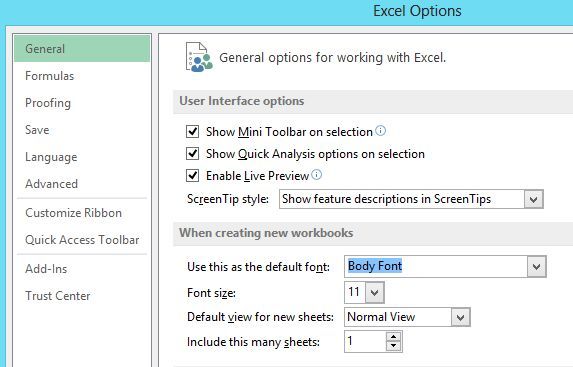
3. In the General section, look for "When creating new workbooks." The very first option: "Use this as the default font." 
Choose the font you want, then click OK. (You an also modify the default font size if you want.)

Now, whenever you start a new workbook, Excel should default to that font..

shop online without a credit card

There are good reasons not to use a credit card online--or at all. Shopping online increases the odds that someone will steal your credit card number. You may want to make a purchase without your spouse knowing about it. And the buy-now-pay-later aspect of credit cards encourage some people to dangerously overspend.
But the online economy is very much a credit card economy. If you're going to buy a song, book, tablet, or just about anything online, you'll be expected to enter a credit card number.

Before we get to the good options, let's discuss an obvious but very bad one: your ATM card. Sure, it has a 16-digit number and can be used as a credit card. But it's a debit card, with the money coming out of your bank account immediately with each charge. If a thief gets your number, he or she could empty your account before you know what happened. Not so with a real credit card, where you pay nothing until you see the monthly bill and can challenge suspicious charges.

Instead, ask your bank to set you up with a secondary account for online purchases, and keep only a small amount in that account. The account would need its own ATM card, with its own credit card number. Just make sure this account lacks overdraft protection; you don't want money moving automatically from your real account into this one.

Another option: Sign up for Paypal, connecting it to your bank account. Not all retail sites support Paypal, but the payment service can give you a debit card that you can use in place of a credit card.

Finally, you can use gift cards, which you can buy at old-fashioned brick-and-mortar stores. You can even buy these with cash.

I checked my local Safeway, and found gift cards for various pre-paid amounts for Amazon, Barnes & Noble, Ebay, Hulu Plus, iTunes, and others. They also sell pre-paid Visa cards, which you could purchase for any amount between $20 to $500. The Visa cards come with a $4 purchase charge; the retailer-specific cards cost nothing beyond the shopping power of the card..

How to manually lower Netflix's streaming bit rate

You can indeed change Netflix's buffer rate on the fly, while you're using the desktop (i.e. browser-based) player.

All you do is press Alt-Shift and then left-click in the player window. In the pop-up Diagnostics menu that appears, click Stream Manager.
Next, click the Manual Selection box, then try lowering the bit rate a few notches. ClickApply and you should have fewer pauses in the playback. If not, try lowering it a bit further still.
This method can also help if your ISP saddles you with a particularly restrictive bandwidth cap. If you typically go over your data limit each month, lower the bit rate. (You can make a more permanent change by venturing into your Netflix account settings and choosingManage Video Quality, though you don't get nearly as many choices here.)
Granted, not many people will need to monkey with these kinds of settings, but if you're not blessed with high-speed Internet or you need to keep a close eye on that data cap, it's nice to know these settings are so readily accessible.

 
Twitter Bird Gadget