Search In Site

Showing posts with label hacking tricks. Show all posts

17 June, 2013

How to Crack Zip Password


Cracking Zip Password Files
FZC is a program that cracks zip files (zip is a method of compressing multiple files into one smaller file) that are password-protected (which means you're gonna need a password to open the zip file and extract files out of it). You can get it anywhere - just use a search engine such as altavista.com.
FZC uses multiple methods of cracking - bruteforce (guessing passwords systematically until the program gets it) or wordlist attacks (otherwise known as dictionary attacks. Instead of just guessing passwords systematically, the program takes passwords out of a "wordlist", which is a text file that contains possible passwords. You can get lots of wordlists at www.theargon.com.).
FZC can be used in order to achieve two different goals: you can either use it to recover a lost zip password which you used to remember but somehow forgot, or to crack zip passwords which you're not supposed to have. So like every tool, this one can be used for good and for evil.
The first thing I want to say is that reading this tutorial... is the easy way to learn how to use this program, but after reading this part of how to use the FZC you should go and check the texts that come with that program and read them all. You are also going to see the phrase "check name.txt" often in this text. These files should be in FZC's directory. They contain more information about FZC.
FZC is a good password recovery tool, because it's very fast and also support resuming so you don't have to keep the computer turned on until you get the password, like it used to be some years ago with older cracking programs. You would probably always get the password unless the password is longer than 32 chars (a char is a character, which can be anything - a number, a lowercase or undercase letter or a symbol such as ! or &) because 32 chars is the maximum value that FZC will accept, but it doesn't really matter, because in order to bruteforce a password with 32 chars you'll need to be at least immortal..heehhe.. to see the time that FZC takes with bruteforce just open the Bforce.txt file, which contains such information.
FZC supports brute-force attacks, as well as wordlist attacks. While brute-force attacks don't require you to have anything, wordlist attacks require you to have wordlists, which you can get from www.theargon.com. There are wordlists in various languages, various topics or just miscellaneous wordlists. The bigger the wordlist is, the more chances you have to crack the password.
Now that you have a good wordlist, just get FZC working on the locked zip file, grab a drink, lie down and wait... and wait... and wait...and have good thoughts like "In wordlist mode I'm gonna get the password in minutes" or something like this... you start doing all this and remember "Hey this guy started with all this bullshit and didn't say how I can start a wordlist attack!..." So please wait just a little more, read this tutorial 'till the end and you can do all this "bullshit".
We need to keep in mind that are some people might choose some really weird passwords (for example: 'e8t7@$^%*gfh), which are harder to crack and are certainly impossible to crack (unless you have some weird wordlist). If you have a bad luck and you got such a file, having a 200MB list won't help you anymore. Instead, you'll have to use a different type of attack. If you are a person that gives up at the first sign of failure, stop being like that or you won't get anywhere. What you need to do in such a situation is to put aside your sweet xxx MB's list and start using the Brute Force attack.
If you have some sort of a really fast and new computer and you're afraid that you won't be able to use your computer's power to the fullest because the zip cracker doesn't support this kind of technology, it's your lucky day! FZC has multiple settings for all sorts of hardware, and will automatically select the best method.
Now that we've gone through all the theoretical stuff, let's get to the actual commands.

Bruteforce
The command line you'll need to use for using brute force is:
fzc -mb -nzFile.zip -lChr Lenght -cType of chars
Now if you read the bforce.txt that comes with fzc you'll find the description of how works Chr Lenght and the Type of chars, but hey, I'm gonna explain this too. Why not, right?... (but remember look at the bforce.txt too)

For Chr Lenght you can use 4 kind of switches...
-> You can use range -> 4-6 :it would brute force from 4 Chr passwors to 6 chr passwords
-> You can use just one lenght -> 5 :it would just brute force using passwords with 5 chars
-> You can use also the all number -> 0 :it would start brute forcing from passwords with lenght 0 to lenght 32, even if you are crazy i don't think that you would do this.... if you are thinking in doing this get a live...
-> You can use the + sign with a number -> 3+ :in this case it would brute force from passwords with lenght 3 to passwords with 32 chars of lenght, almost like the last option...

For the Type of chars we have 5 switches they are:
-> a for using lowercase letters
-> A for using uppercase letters
-> ! for using simbols (check the Bforce.txt if you want to see what simbols)
-> s for using space
-> 1 for using numbers

Example:
If you want to find a password with lowercase and numbers by brute force you would just do something like:
fzc -mb -nzTest.zip -l4-7 -ca1
This would try all combinations from passwords with 4 chars of lenght till 7 chars, but just using numbers and lowercase.
You should never start the first brute force attack to a file using all the chars switches, first just try lowercase, then uppercase, then uppercase with number then lowercase with numbers, just do like this because you can get lucky and find the password much faster, if this doesn't work just prepare your brain and start with a brute force that would take a lot of time. With a combination like lowercase, uppercase, special chars and numbers.

Wordlis
Like I said in the bottom and like you should be thinking now, the wordlist is the most powerfull mode in this program. Using this mode, you can choose between 3 modes, where each one do some changes to the text that is in the wordlist, I'm not going to say what each mode does to the words, for knowing that just check the file wlist.txt, the only thing I'm going to tell you is that the best mode to get passwords is mode 3, but it takes longer time too.
To start a wordlist attak you'll do something like.
fzc -mwMode number -nzFile.zip -nwWordlist
Where:
Mode number is 1, 2 or 3 just check wlist.txt to see the changes in each mode.
File.zip is the filename and Wordlist is the name of the wordlist that you want to use. Remember that if the file or the wordlist isn't in the same directory of FZC you'll need to give the all path.
You can add other switches to that line like -fLine where you define in which line will FZC start reading, and the -lChar Length where it will just be read the words in that char length, the switche works like in bruteforce mode.
So if you something like
fzc -mw1 -nztest.zip -nwMywordlist.txt -f50 -l9+
FZC would just start reading at line 50 and would just read with length >= to 9.

Example:
If you want to crack a file called myfile.zip using the "theargonlistserver1.txt" wordlist, selecting mode 3, and you wanted FZC to start reading at line 50 you would do:
fzc -mw3 -nzmyfile.zip -nwtheargonlistserver1.txt -f50

Resuming
Other good feature in FZC is that FZC supports resuming. If you need to shutdown your computer and FZC is running you just need to press the ESC key, and fzc will stop. Now if you are using a brute force attack the current status will be saved in a file called resume.fzc but if you are using a wordlist it will say to you in what line it ended (you can find the line in the file fzc.log too).
To resume the bruteforce attack you just need to do:
fzc -mr
And the bruteforce attack will start from the place where it stopped when you pressed the ESC key.
But if you want to resume a wordlist attack you'll need to start a new wordlist attack, saying where it's gonna start. So if you ended the attack to the file.zip in line 100 using wordlist.txt in mode 3 to resume you'll type
fzc -mw3 -nzfile.zip -nwwordlist.txt -f100
Doing this FZC would start in line 100, since the others 99 lines where already checked in an earlier FZC session.
Well, it looks like I covered most of what you need to know. I certainly hope it helped you... don't forget to read the files that come with the program

Using Backtrack
We frequently use zipped files due to its small size and strong encryption algorithm. These zipped files comes with a facility of password protection which maintains the security of the files.
But sometimes this security feature turns into a drawback if we somehow forget the password. In that case the password cracker play their role. You can also use them if you downloaded a zipped file with password protection on it.
In my last article, if you followed then we learned to make a bootable USB of backtrack. So here I'm gonna introduce a tool which is present in Backtrack and if you have no past experience with Linux then no issues you can start from here. The open source tool we are gonna use is called fcrackzip.
fcrackzip is a fast password cracker partly written in assembler. It is able to crack password protected zip files with brute force or dictionary based attacks, optionally testing with unzip its results.
Here, for the demonstration I'm gonna make a file crackme.zip with a password abcde using winrar. You can also try with me from here.
1) Right click on the file > select add to archieve..
2) Under General tab select ZIP rather than RAR, then under Advanced tab > set Password
3) Suppose our final password protected zip file is crackme.zip (you can use your own)
4) Now copy this file on the desktop for ease in your Backtrack
5) Then click on the Top Right button saying Applications.
6) Navigate to Backtrack > Privilege Escalation > Password Attacks > Offline Attacks > fcrackzip
7) The following terminal screen will pop up
The fcrackzip is loaded with the following options:
-b brute force
-D dictionary Attack
-B benchmark
-c charset characterset
-h help
-V validate
-p init-password string
-l length min-max
-u use-unzip
-m method num
-2 modulo r/m
8) I'm going to apply the brute force attack for password cracking. So the following command will be useful...
fcrackzip -b -c a -l 1-6 /root/Desktop/crackme.zip
here,
-b > bruteforce
-c a > charset lower case alphabets
-l 1-6 > length of expected password
9) Hit Enter and wait for few minutes. fcrackzip combining with Backtrack turns into a more faster password cracking tool
10) That's it. It'll show the password after certain attempts.

15 June, 2013

Guide to Hacking with sub7

Guide to Hacking with sub7

Well first you need a victim so ICQ would be a brilliant place to start, considering you can get a program that’ll give you that victim’s I.P if you can’t get the scanner on sub7 to work. However they need to be on your list to get their I.P a good program would be wonder ICQ me get it at http://www.8th-wonder.com after you’ve logged their I.P you need to customise your virus:
See The screen shot f edit server: 

In the port field choose a number between 0001 – 9999 (just for ease of memory) and note that, then give the victim a name. Enter a protect password if you don’t want anyone else to be able to hack them don’t enter a password in the 3rd box because the victim will have to enter a password to let the virus work oh and give the server a innocent sounding filename like win update. Now to start-up methods: This is quite easy: just select 1 or more start-up methods (choose all if you want it difficult to remove here.) Now onto notifications: get an ICQ account and get it to tell you like that it is most reliable and gives u their I.P too which means you don’t need to get their I.P via a tool but I prefer to in case the notify doesn’t work. 

Now binded files: this just lets you make files get run or extracted (to make it look genuine so if you said it’s a pic then add a pic (you get the idea.)) Plugins is just the .dll files you integrate with server so you can play with their PC (they’ll be in the folder you extracted sub7 to) I recommend fun1 and 2 plus advanced and ICQpwsteal (all of them if you think the victim won’t get suspicious of the size.) I won’t bother with restrictions because that’s just to limit your fun so leave that alone… e-mail let’s you be notified of the victims keypresses via e-mail (and passwords that is recorded and aim, msn & ICQ etc…) now the final touches:  
If you didn’t put any files in with it the fake error message is perfect (don’t forget to configure it) I recommend you don’t bother with download from web. Put a tick in change server icon (make sure it matches with what the victim thinks they’re downloading then you’re done! Now just click save as… (put it somewhere you can remember) and name it (something like pics and don’t forget to put .exe after it E.G.: if you call it pics type pics.exe) geddit?   

Hacking the Victim
Now the fun part get yourself a victim one without an anti-virus (or one stupid enough to believe that they need to disable it make up something like “it’s a self-extracting exe disable ur anti-virus or it’ll corrupt your.dll files”). After the victim has downloaded and run the file you should get a notification (if you enabled the function) so if you haven’t already got their I.P you will now! Now load sub7 and enter their I.P and the port number (I hope you remembered!) if you gave a protect password you’ll be asked to enter that. Now the fun begins: if you want to be malicious then I’m going to leave that for you to discover but here’s a screenshot for the fun stuff: 

As you can – can’t see you can open & close their cd-rom, start & stop an annoying beep on the system speakers let’s just say there’s loads of stuff! I suggest getting zonealarm form http://www.zonelabs.com and infecting yourself, eventually zonealarm will detect it and ask you if you want to give the virus server capabilities, which you say no. Then go into the program & find the virus and give it only local server abilities to connect to yourself you don’t need to be on the internet just put the correct port number for the virus and put localhost and click connect and have fun with yourself!!! May I recommend the realistic matrix program on sub7 btw

Guide to hack Unix For Beginners

In the following file, all references  made to the name unix, may also be  substituted to the xenix operating  system.

Brief history: Back in the early  sixties, during the development of  third generation computers at mit,  a group of programmers studying the  potential of computers, discovered  their ability of performing two or  more tasks simultaneously.  Bell  labs, taking notice of this discovery,  provided funds for their developmental  scientists to investigate into this  new frontier.  After about 2 years of  developmental research, they produced  an operating system they canlmd "unix".Sixties to current:  during this time  bell systems installed the unix system  to provide their computer operators  with the ability to multitask so that  they could become more productive,  and efficient.One of the systems they put on the unix system was called  "elmos". Through elmos many tasks (i.e. billing,and installation records) could  be done by many people using the same mainframe.Note: cosmos is accessed through the elmos system.Current:today, with the development  of micro computers, such multitasking  can be achieved by a scaled down  version of unix (but just as powerful).Microsoft,seeing this  development, opted to develop their own  unix like system for the ibm line of  pc/xt's.Their result they called  xenix (pronounced zee-nicks).Both  unix and xenix can be easily installed 
On ibm pc's and offer the same function 
(just 2 different vendors). 
 Note: due to the many different Versions of unix (berkley unix, Bell system iii, and system v The most popular) many commands Following may/may not work. I have Written them in system v routines. Unix/xenix operating systems will Be considered identical systems below.  How to tell if/if not you are on a Unix system:  unix systems are quite Common systems across the country. Their security appears as such: 
 Login;     (or login;) 
Password: 
 When hacking on a unix system it is Best to use lowercase because the unix System commands are all done in lower-Case. 
Login; is a 1-8 character field. It is Usually the name (i.e. joe or fred) Of the user, or initials (i.e. j.jones Or f.wilson).  Hints for login names Can be found trashing the location of the dial-up (use your cn/a to find Where the computer is). Password: is a 1-8 character password Assigned by the sysop or chosen by the 
User. 
Common default logins 
login;       password: 
root         root,system,etc.. 
sys          sys,system 
daemon       daemon 
uucp         uucp 
tty          tty 
test         test 
unix         unix 
bin          bin 
adm          adm 
who          who 
learn        learn 
uuhost       uuhost 
nuucp        nuucp 
If you guess a lgin name and you are Not asked for a password, and have Accessed to the system, then you have What is known as a non-gifted account. If you guess a correct login and pass-Word, then you have a user account. And, if you guess the root password, Then you have a "super-user" account. All unix systems have the following Installed to their system: Root, sys, bin, daemon, uucp, adm Once you are in the system, you will Get a prompt. Common prompts are: 


But can be just about anything the Sysop or user wants it to be. 
 Things to do when you are in: some Of the commands that you may want to Try follow below: 
 Who is on  (shows who is currently logged on the system.) Write name (name is the person you             wish to chat with) to exit chat mode try ctrl-d. eot=end of transfer. Ls -a(list all files in current             directory.) 
Du -a (checks amount of memory your files use;disk usage) 
Cd\name    (name is the name of the sub-directory you choose) 
Cd\        (brings your home directory to current use) 
Cat name   (name is a filename either a program or documentation your username has written) 
most unix programs are writte in the c language or pascal since unix is a programmers' environment.one of the first things done on the System is print up or capture (in a Buffer) the file containing all user Names and accounts. This can be done By doing the following command: 
 Cat /etc/passwd 
 If you are successful you will a list Of all accounts on the system.It Should look like this: 
 Root:hvnsdcf:0:0:root dir:/: 
Joe:majdnfd:1:1:joe cool:/bin:/bin/joe 
Hal::1:2:hal smith:/bin:/bin/hal 
 The "root" line tells the following Info : 
Login name=root 
Hvnsdcf   = encrypted password 
0         = user group number 
0         = user number 
Root dir  = name of user 
/         = root directory 
 In the joe login, the last part "/bin/joe " tells us which directory Is his home directory (joe) is. 
 In the "hal" example the login name is Followed by 2 colons, that means that There is no password needed to get in Using his name.                                                                                               

14 June, 2013

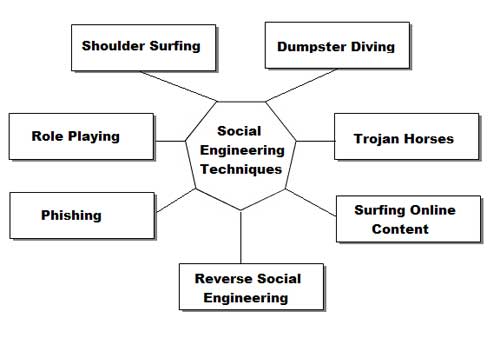
SOCIAL ENGINEERING - An Overview

What is social engineering?
Social Engineering: n.  Term used among crackers and  samurai for cracking techniques that rely on weaknesses in  wetware rather than software; the aim is to trick people into revealing passwords or other information that compromises a target  system's security.  Classic scams include phoning up a mark who has  the required information and posing as a field service tech or a fellow employee with an urgent access problem. 
This is true. Social engineering, from a narrow point of view, is basically phone scams which pit your knowledge and wits against another human. This technique is used for a lot of things, such as gaining passwords, keycards and basic information on a system or organization.

Why is there a FAQ about it?
Good question. I'm glad I asked. I made this for a few reasons. The first being that Social Engineering is rarely discussed. People discuss cracking and phreaking a lot, but the forum for social engineering ideas is
stagnant at best. Hopefully this will help generate more discussion. I also find that social engineering specialists get little respect, this will show ignorant hackers what we go through to get passwords. The last reason is honestly for a bit of Neophyte training. Just another DOC for them to read so I don't get bogged with email.

Who Cares?
To Neophytes: You should, you little fuck. If you think the world of computers and security opens up to you through a keyboard and your redbox then you are so fucking dead wrong. Good. Go to your school, change your grades and be a "badass" hacker. Hacking, like real life, exists in more than just your system. You can't use proggies to solve everything. I don't mean to sound upset, but jesus, have a bit of innovation and a sense of adventure.
To Experienced Hackers: Just thought it would help a bit.

Basic intro and shit for this document.
This FAQ will address phone techniques, mail techniques, internet techniques and live techniques. I will discuss Equipment and will put some scripts of actual conversations from social engineering. There are times I might discuss things that cross the line into phreaking or traditional hacking. Don't send me email and say that my terms aren't correct and blahblahblah isn't social engineering. I use them for convenience and lack of
better methods of explanation (eg I might say "dumpster diving is a form of social engineering") Don't get technical.

Basics
This is probably the most common social engineering technique. It's quick, painless and the lazy person can do it. No movement, other than fingers is necessary. Just call the person and there you go. Of course it gets more complicated than that.

What Equipment is necessary for this?
The most important peice of hardware is your wetware. You have to have a damn quick mind. As far as physical Equipment goes, a phone is necessary. Do not have call waiting as this will make you sound less believeable. There is no real reason why this does but getting beeped in the middle of a scam just
throws off the rhythym. The phone should be good quality and try to avoid cordless, unless you never get static on them. Some phones have these great buttons that make office noise in the background. Caller ID units are helpful if you pull off a scam using callback. You don't want to be expecting your girlfriend and pick up the phone and say, "I wanna fuck you" only to find out it was an IBM operator confirming your
identity. Operators don't want to have sex with you and so your scam is fucked. Besides, call ID units are just cool because you can say, "Hello, <blank>" when someone calls. The Radio Slut carries these pretty cheap.
Something I use is a voice changer. It makes my voice sound deeper than James Earl Jones or as high as a woman. This is great if you can't change your pitch very well and you don't want to sound like a kid (rarely helpful). Being able to change gender can also be very helpful (see technique below). I got one for a gift from Sharper Image. This means that brand will cost quite a bit of cash, but it's very good quality. If anyone knows of other brand of voice changers, please inform me.

Phreaking and Social engineering? 
Social Engineering and phreaking cross lines quite a lot. The most obvious reasons are because phreaks need to access Ma Bell in other ways but computers. They use con games to draw info out of operators.
Redboxing, greenboxing and other phreaking techniques can be used to avoid the phone bills that come with spending WAAAAYYY too much time on the phone trying to scam a password. Through the internet, telnetting to california is free. Through ma bell, it's pricey. I say making phone calls from payphones is fine, but beware of background noise. Sounding like you're at a payphone can make you sound pretty  unprofessional. Find a secluded phone booth to use.

How do I pull off a social engineering with a phone?
First thing is find your mark. Let's say you want to hit your school. Call the acedemic computer center (or its equivelent). Assuming you already have an account, tell them you can't access your account. At this point they might do one of two things. If they are stupid, which you hope they are, they will give you a new password. Under that precept, they'll do that for most people. Simply finger someone's account, specifically a faculty member. At this point, use your voice changer when you call and imitate that teacher the best you can. People sound different over the phone, so you'll have a bit of help. 
Try to make the person you're imitating a female (unless you are a female). Most of the guys running these things will give anything to a good sounding woman because the majority of the guys running minicomputers are social messes. Act like a woman (using voice changer) and you'll have anything you want from them. 
Most of the time the people working an area will ask for some sort of verification for your identity, often a social security number. You should find out as much information about a mark as you can (see mail and live
techniques) before you even think about getting on the phone. If you say you are someone you aren't and then they ask you for verification you don't have, they will be suspicious and it will be infinitely more difficult to take that system.
Once again for idiots: DO NOT TRY TO SOCIAL ENGINEER WITHOUT SUFFICIENT INFORMATION ON YOUR MARK!
Once people believe you are someone, get as much as you can about the system. Ask for your password, ask for telnet numbers, etc. Do not ask for too much as it will draw suspicion.You must sound like a legitimate person. Watch your mark. Learn to speak like him/her. Does that person use contractions? Does that person say "like" a lot? Accent? Lisp? 
The best way for observation of speech is to call the person as a telemarketer or telephone sweepstakes person. Even if they just tell you they can't talk to you, you can learn a quite a bit from the way they speak. If
they actually want to speak to you, you can use that oppurtunity to glean information on them. Tell them they won something and you need their address and social security number and other basic info. 
WARNING: ABUSING SOMEONE'S SOCIAL SECURITY NUMBER IS ILLEAGAL!!!
DON'T SAY YOU WEREN'T WARNED!!!

collection of windows hacking Secrets


Some Selected PC Hacking Secrets
Almost all system administrators make certain changes and make the system restricted. System Administrators can hide the RUN option, the FIND command, the entire Control Panel, drives in My Computer like D: A: etc. They can even restrict activities of a hacker my disabling or hiding, even the tiniest options or tools.

Most commonly these restrictions are imposed locally and are controlled by the Windows Registry. But sometimes the smart system administrators control the activities of the hacker by imposing restrictions remotely through the main server.
Poledit or Policy Editor is a small kewl tool which is being commonly used by system administrators to alter the settings of a system. This utility is not installed by default by Windows. You need to install in manually from the Windows 98 Installation Kit from the Resource Kit folder. user.dat file that we saw earlier.

The Policy Editor tool imposes restrictions on the user's system by editing the user.dat file which in turn means that it edits the Windows Registry to change the settings. It can be used to control or restrict access to each and every folder and option you could ever think of. It has the power to even restrict access to individual folders, files, the Control Panel, MS DOS, the drives available etc. Sometimes this software does make life really hard for a Hacker. So how can we remove the restrictions imposed by the Policy Editor? Well read ahead to learn more.

You see the Policy Editor is not the only way to restrict a user's activities. As we already know that the Policy Editor edits the Windows Registry(user.dat) file to impose such restrictions. So this in turn would mean that we can directly make changes to the Windows Registry using a .reg file or directly to remove or add restrictions.
Launch Regedit and go to the following Registry Key:
HKEY_CURRENT_USER/Software/Microsoft/CurrentVersion/Policies
Under this key, there will definitely be a key named explorer. Now under this explorer key we can create new DWORD values and modify it's value to 1 in order to impose the restriction. If you want to remove the Restriction, then you can simply delete the respective DWORD values or instead change their values to 0. The following is a list of DWORD values that can be created under the Explorer Key-:
NoDeletePrinter: Disables Deletion of already installed Printers
NoAddPrinter: Disables Addition of new Printers
NoRun : Disables or hides the Run Command
NoSetFolders: Removes Folders from the Settings option on Start Menu (Control Panel, Printers, Taskbar)
NoSetTaskbar: Removes Taskbar system folder from the Settings option on Start Menu
NoFind: Removes the Find Tool (Start >Find)
NoDrives: Hides and does not display any Drives in My Computer
NoNetHood: Hides or removes the Network Neighborhood icon from the desktop
NoDesktop: Hides all items including, file, folders and system folders from the Desktop
NoClose: Disables Shutdown and prevents the user from normally shutting down Windows.
NoSaveSettings: Means to say, 'Don't save settings on exit'
DisableRegistryTools: Disable Registry Editing Tools (If you disable this option, the Windows Registry Editor(regedit.exe) too
will not work.)
NoRecentDocsHistory: Removes Recent Document system folder from the Start Menu (IE 4 and above)
ClearRecentDocsOnExit: Clears the Recent Documents system folder on Exit.
Nolnternetlcon: Removes the Internet (system folder) icon from the Desktop
Under the same key: HKEY_CURRENT_USER/Software/Microsoft/CurrentVersion/Policies you can create new subkeys other than the already existing Explorer key. Now create a new key and name it System. Under this new key, system we can create the following new DWORD values(1 for enabling the particular option and 0 for disabling the particular option):
NODispCPL: Hides Control Panel
NoDispBackgroundPage: Hides Background page.
NoDispScrsavPage: Hides Screen Saver Page
NoDispAppearancePage: Hides Appearance Page
NoDispSettingsPage: Hides Settings Page
NoSecCPL: Disables Password Control Panel
NoPwdPage: Hides Password Change Page
NoAdminPaqe: Hides Remote Administration Page
NoProfilePage: Hides User Profiles Page
NoDevMgrPage: Hides Device Manager Page
NoConfigPage: Hides Hardware Profiles Page
NoFileSysPage: Hides File System Button
NoVirtMemPage: Hides Virtual Memory Button
Similarly, if we create a new subkey named Network, we can add the following DWORD values under it(1 for enabling the particular option and 0 for disabling the particular option):
NoNetSetupSecurityPage: Hides Network Security Page
NoNelSetup: Hides or disables the Network option in the Control Panel
NoNetSetupIDPage: Hides the Identification Page
NoNetSetupSecurityPage: Hides the Access Control Page
NoFileSharingControl: Disables File Sharing Controls
NoPrintSharing: Disables Print Sharing Controls
Similarly, if we create a new subkey named WinOldApp, we can add the following DWORD values under it(1 for enabling the particular option and 0 for disabling the particular option):
Disabled: Disable MS-DOS Prompt
NoRealMode: Disable Single-Mode MS-DOS.
So you see if you have access to the Windows Registry, then you can easily create new DWORD values and set heir value to 1 for enabling the particular option and 0 for disabling the particular option. But Sometimes, access to the Windows Registry is blocked. So what do you do? Go to the Windows Directory and delete either user.dat or system.dat (These 2 files constitute the Windows Registry.) and reboot. As soon as Windows logs in, it will display a Warning Message informing you about an error in the Windows Registry. Simply ignore this Warning Message and Press CTRL+DEL+ALT to get out of this warning message.(Do not press OK) You will find that all restrictions have been removed.
The most kind of restriction found quite commonly is the Specific Folder Restriction, in which users are not allowed access to specific folders, the most common being the Windows folder, or sometimes even access to My Computer is blocked. In effect, you simply cannot seem to access the important kewl files which are needed by you to do remove restrictions. What do you? Well use the RUN command. (START >RUN). But unfortunately a system administrator who is intelligent enough to block access to specific folder, would definitely have blocked access to the RUN command. Again we are stuck.
Windows is supposed to be the most User Friendly Operating System on earth. (At least Microsoft Says so.)
It gives the User an option to do the same thing in various ways. You see the RUN command is only the most convenient option of launching applications, but not the only way. In Windows you can create shortcuts to almost anything from a file, folder to a Web URL. So say your system administrator has blocked access to the c:\windows\system folder and you need to access it. What do you do? Simply create a Shortcut to it. To do this right click anywhere on the desktop and select New > Shortcut. A new window titled Create Shortcut pops up. Type in the path of the restricted folder you wish to access, in this case c:\windows\system. Click Next, Enter the friendly name of the Shortcut and then click Finish. Now you can access the restricted folder by simply double clicking on the shortcut icon. Well that shows how protected and secure *ahem Windows *ahem is.
HACKING TRUTH: Sometimes when you try to delete a file or a folder, Windows displays an error message saying that the file is protected. This simply means that the file is write protected, or in other words the R option is +. Get it? Anyway, you can stop Windows from displaying this error message and straightaway delete this file by changing its attributes to Non Read Only. This can be done by Right Clicking on the file, selecting Properties and then
unselecting the Read Only Option.
There is yet another way of accessing restricted folders. Use see, DOS has a lovely command known as START. Its general syntax is:
START application_path
It does do what it seems to do, start applications. So in you have access to DOS then you can type in the START command to get access to the restricted folder. Now mostly access to DOS too would be blocked. So again you can use the shortcut trick to launch, c:\command.com or c:\windows\command.com. (Command.com is the file which launches MS DOS).

Accessing Restricted Drives.
The problem with most system administrators is that they think that the users or Hackers too are stupid. Almost all system administrators use the Registry Trick (Explained Earlier) to hide all drives in My Computer. So in order to unhide or display all drives, simply delete that particular key.(Refer to beginning of Untold Secrets Section.)
Some systems have the floppy disk disabled through the BIOS. On those systems if the BIOS is protected, you may need to crack the BIOS password. (For that Refer to the Windows Hacking Chapter). Sometimes making drives readable (Removing R +) and then creating Shortcuts to them also helps us to get access to them.
Further Changing your Operating System's Looks by editing .htt files
If you have installed Windows Desktop Update and have the view as Web Page option enabled, you can customise the way the folder looks by selecting View > Customise this folder. Here you can change the background and other things about that particular folder. Well that is pretty lame, right? We hackers already know things as lame as that. Read on for some kewl stuff.
Well, you could also change the default that is stored in a Hidden HTML Template file (I think so..) which is nothing but a HTML document with a .htt extension. This .htt file is found at: %systemroot%\web\folder.htt.
The %systemroot% stands for the drive in which Windows is Installed, which is normally C:
You can edit these .htt files almost just like you edit normal .HTM or .HTML files. Simply open them in an ASCII editor like Notepad. The following is a list of .htt files on your system which control various folders and which can be edited to customise the way various folders look.
controlp.htt Control Panel
printers.htt Printers
mycomp.htt My Computer
safemode.htt Safe Mode
All these files are found in the web folder in %systemfolder%. The folder.htt file has a line:
'Here's a good place to add a few lines of your own"
which is the place where you can add your own A HREF links. These links would then appear in the folder whose folder.htt file you edited. All this might sound really easy and simple, but you see these .htt files do not contain normal HTML code, instead they contain a mixture of HTML and web bots. Hence they can be difficult for newbies to understand

Hack facebook Using Cookie Stealing Attack

Learn How To Hack Facebook Using Cookie Stealing Attack.This method works only when the victims computer is in a LAN.


What Are Cookies ? And What Is The Use Of Stealing Cookies ?
Cookies are small files that stored on users computer by websites when a user visits them. The stored Cookies are used by the web server to identify and authenticate the user .For example when a user logins in Facebook a unique string is generated and one copy of it is saved on the server and other is saved on the users browser as Cookies. Both are matched every time the user does any thing in his account
So if we steal the victims cookie and inject them in our browser we will be able to imitate the victims identity to the web server and thus we will be able to login is his account . This is called as Side jacking .The best thing about this is that we need not no the victims id or password all we need is the victims cookie.
Hack Facebook / Twitter By Stealing Cookies ?
1. Ettercap or Cain andable for ARP poisoning the victim
2. Wire shark for sniffing and stealing cookies
3. Firefox browser and Cookie logger add on for injecting the stolen cookies in our browser

1. First ARP poison the victim .For this Click The Link Here
2. After ARP poisoning open Wire shark ,click capture button from the menu bar , then select interface .Now select your interface (usually eth0 ) finally click start capture .
3. Now you can see the packets being captured , wait for a while till the victim logs in his account( Facebook /twitter ),
4. Mean while Find the IP address of Facebook ,for this you can open CMD (command prompt ) and enter .Ping Facebook.com to find its IP address.
5. Now filter the packets by entering the the IP address (Facebook) in the filter bar and click apply 
6. Now Locate HTTP Get /home.php  and copy all the cookie names and values in a notepad.
7. Now open Firefox and open add and edit cookies ,which we downloaded earlier , add all the cookie values and save them.
 8. Now open Facebook in a new tab , you will be logged in the victims account .
Finaly you have hacked the victims Facebook account by stealing cookies , You can also follow the same steps to hack  Twitter accounts.

13 June, 2013

How to hack Windows XP Admin Passwords


Learn To Hack XP Admin Password In Easiest Way
This hack will only work if the person that owns the machine has no intelligence. 
This is how it works:
When you or anyone installs Windows XP for the first time your asked to put in your username and up to five others. Now, unknownst to a lot of other people this is the only place in Windows XP that you can password the default Administrator Diagnostic 
Account. This means that to by pass most administrators accounts  on Windows XP all you have to do is boot to safe mode by pressing F8 
during boot up and choosing it. Log into the Administrator Account  and create your own or change the password on the current Account.
This only works if the user on setup specified a password for the  Administrator Account.
This has worked for me on both Windows XP Home and Pro. 
Now this one seems to be machine dependant, it works randomly(don't know why) .If you log into a limited account on your target machine and open up a dos prompt then enter this set of commands Exactly:

simple TCP spoofing attack


Over the past few years TCP sequence number prediction attacks have become a real threat against unprotected networks, taking advantage of the inherent trust relationships present in many network installations.  TCP sequence
number prediction attacks have most commonly been implemented by opening a series of connections to the target host, and attempting to predict the sequence number which will be used next.  Many operating systems have
therefore attempted to solve this problem by implementing a method of generating sequence numbers in unpredictable fashions.  This method does not solve the problem.
This advisory introduces an alternative method of obtaining the initial sequence number from some common trusted services.  The attack presented here does not require the attacker to open multiple connections, or flood a port on the trusted host to complete the attack.  The only requirement is that source routed packets can be injected into the target network with fake source addresses.
This advisory assumes that the reader already has an understanding of how TCP sequence number prediction attacks are implemented.
The impact of this advisory is greatly diminished due to the large number of organizations which block source routed packets and packets with addresses inside of their networks.  Therefore we present the information as more of
a 'heads up' message for the technically inclined, and to re-iterate that the randomization of TCP sequence numbers is not an effective solution against this attack.

Technical Details
~~~~~~~~~~~~~~~~~
The problem occurs when particular network daemons accept connections with source routing enabled, and proceed to disable any source routing options on the connection.  The connection is allowed to continue, however
the reverse route is no longer used.  An example attack can launched against the in.rshd daemon, which on most systems will retrieve the socket options via getsockopt() and then turn off any dangerous options via setsockopt().
An example attack follows. 
Host A is the trusted host
Host B is the target host
Host C is the attacker
Host C initiates a source routed connection to in.rshd on host B, pretending to be host A.
Host C spoofing Host A         <SYN>    -->  Host B in.rshd
Host B receives the initial SYN packet, creates a new PCB (protocol control block) and associates the route with the PCB.  Host B responds, using the reverse route, sending back a SYN/ACK with the sequence number.
Host C spoofing Host A  <--  <SYN/ACK>       Host B in.rshd
Host C responds, still spoofing host A, acknowledging the sequence number. Source routing options are not required on this packet.
Host C spoofing Host A         <ACK>    -->  Host B in.rshd
We now have an established connection, the accept() call completes, and control is now passed to the in.rshd daemon.  The daemon now does IP options checking and determines that we have initiated a source routed
connection.  The daemon now turns off this option, and any packets sent thereafter will be sent to the real host A, no longer using the reverse route which we have specified.  Normally this would be safe, however the
attacking host now knows what the next sequence number will be.  Knowing this sequence number, we can now send a spoofed packet without the source routing options enabled, pretending to originate from Host A, and our
command will be executed. 
In some conditions the flooding of a port on the real host A is required if larger ammounts of data are sent, to prevent the real host A from responding with an RST.  This is not required in most cases when performing
this attack against in.rshd due to the small ammount of data transmitted. It should be noted that the sequence number is obtained before accept() has returned and that this cannot be prevented without turning off source
routing in the kernel.
As a side note, we're very lucky that TCP only associates a source route with a PCB when the initial SYN is received.  If it accepted and changed the ip options at any point during a connection, more exotic attacks may be possible.
These could include hijacking connections across the internet without playing a man in the middle attack and being able to bypass IP options checking imposed by daemons using getsockopt().  Luckily *BSD based TCP/IP stacks will
not do this, however it would be interesting to examine other implementations. 

Impact
~~~~~~
The impact of this attack is similar to the more complex TCP sequence number prediction attack, yet it involves fewer steps, and does not require us to 'guess' the sequence number.  This allows an attacker to execute
arbitrary commands as root, depending on the configuration of the target system.  It is required that trust is present here, as an example, the use of .rhosts or hosts.equiv files.

Solutions
~~~~~~~~~
The ideal solution to this problem is to have any services which rely on IP based authentication drop the connection completely when initially detecting that source routed options are present.  Network administrators
and users can take precautions to prevent users outside of their network from taking advantage of this problem.  The solutions are hopefully already either implemented or being implemented.
1. Block any source routed connections into your networks
2. Block any packets with internal based address from entering your network.
Network administrators should be aware that these attacks can easily be launched from behind filtering routers and firewalls.  Internet service providers and corporations should ensure that internal users cannot launch
the described attacks.  The precautions suggested above should be implemented to protect internal networks.
Example code to correctly process source routed packets is presented here as an example.  Please let us know if there are any problems with it.
This code has been tested on BSD based operating systems.
        u_char optbuf[BUFSIZ/3];
        int optsize = sizeof(optbuf), ipproto, i;
        struct protoent *ip;

        if ((ip = getprotobyname("ip")) != NULL)
                ipproto = ip->p_proto;
        else
                ipproto = IPPROTO_IP;
        if (!getsockopt(0, ipproto, IP_OPTIONS, (char *)optbuf, &optsize) &&
            optsize != 0) {
                for (i = 0; i < optsize; ) {
                        u_char c = optbuf[i];
                        if (c == IPOPT_LSRR || c == IPOPT_SSRR)
                                exit(1);
                        if (c == IPOPT_EOL)
                                break;
                        i += (c == IPOPT_NOP) ? 1 : optbuf[i+1];
                }
        }
One critical concern is in the case where TCP wrappers are being used.  If a user is relying on TCP wrappers, the above fix should be incorporated into fix_options.c.  The problem being that TCP wrappers itself does not close
the connection, however removes the options via setsockopt().  In this case when control is passed to in.rshd, it will never see any options present, and the connection will remain open (even if in.rshd has the above patch
incorporated).  An option to completely drop source routed connections will hopefully be provided in the next release of TCP wrappers.  The other option is to undefine KILL_IP_OPTIONS, which appears to be undefined by default.
This passes through IP options and allows the called daemon to handle them accordingly.

Disabling Source Routing
~~~~~~~~~~~~~~~~~~~~~~~~
We believe the following information to be accurate, however it is not guaranteed.
--- Cisco
To have the router discard any datagram containing an IP source route option issue the following command:
no ip source-route
This is a global configuration option.
--- NetBSD
Versions of NetBSD prior to 1.2 did not provide the capability for disabling source routing.  Other versions ship with source routing ENABLED by default. We do not know of a way to prevent NetBSD from accepting source routed packets. NetBSD systems, however, can be configured to prevent the forwarding of packets
when acting as a gateway. 
To determine whether forwarding of source routed packets is enabled, issue the following command:
# sysctl net.inet.ip.forwarding
# sysctl net.inet.ip.forwsrcrt
The response will be either 0 or 1, 0 meaning off, and 1 meaning it is on.
Forwarding of source routed packets can be turned off via:
# sysctl -w net.inet.ip.forwsrcrt=0
Forwarding of all packets in general can turned off via:
# sysctl -w net.inet.ip.forwarding=0

--- BSD/OS
BSDI has made a patch availible for rshd, rlogind, tcpd and nfsd.  This patch is availible at:
ftp://ftp.bsdi.com/bsdi/patches/patches-2.1
OR via their patches email server <patches@bsdi.com>
The patch number is
U210-037 (normal version)
D210-037 (domestic version for sites running kerberized version)
BSD/OS 2.1 has source routing disabled by default
Previous versions ship with source routing ENABLED by default.  As far as we know, BSD/OS cannot be configured to drop source routed packets destined for itself, however can be configured to prevent the forwarding of such
packets when acting as a gateway.
To determine whether forwarding of source routed packets is enabled, issue the following command:
# sysctl net.inet.ip.forwarding
# sysctl net.inet.ip.forwsrcrt
The response will be either 0 or 1, 0 meaning off, and 1 meaning it is on.
Forwarding of source routed packets can be turned off via:
# sysctl -w net.inet.ip.forwsrcrt=0
Forwarding of all packets in general can turned off via:
# sysctl -w net.inet.ip.forwarding=0

--- OpenBSD
Ships with source routing turned off by default.  To determine whether source routing is enabled, the following command can be issued:
# sysctl net.inet.ip.sourceroute
The response will be either 0 or 1, 0 meaning that source routing is off, and 1 meaning it is on.  If source routing has been turned on, turn off via:
# sysctl -w net.inet.ip.sourceroute=0
This will prevent OpenBSD from forwarding and accepting any source routed packets.

--- FreeBSD
Ships with source routing turned off by default.  To determine whether source routing is enabled, the following command can be issued:
# sysctl net.inet.ip.sourceroute
The response will be either 0 or 1, 0 meaning that source routing is off, and 1 meaning it is on.  If source routing has been turned on, turn off via:
# sysctl -w net.inet.ip.sourceroute=0

--- Linux
Linux by default has source routing disabled in the kernel.
--- Solaris 2.x
Ships with source routing enabled by default.  Solaris 2.5.1 is one of the few commercial operating systems that does have unpredictable sequence numbers, which does not help in this attack.
We know of no method to prevent Solaris from accepting source routed connections, however, Solaris systems acting as gateways can be prevented from forwarding any source routed packets via the following commands:
# ndd -set /dev/ip ip_forward_src_routed 0
You can prevent forwarding of all packets via:
# ndd -set /dev/ip ip_forwarding 0
These commands can be added to /etc/rc2.d/S69inet to take effect at bootup.

--- SunOS 4.x
We know of no method to prevent SunOS from accepting source routed connections, however a patch is availible to prevent SunOS systems from forwarding source routed packets.
This patch is availible at:
ftp://ftp.secnet.com/pub/patches/source-routing-patch.tar.gz
To configure SunOS to prevent forwarding of all packets, the following
command can be issued:
# echo "ip_forwarding/w 0" | adb -k -w /vmunix /dev/mem
# echo "ip_forwarding?w 0" | adb -k -w /vmunix /dev/mem
The first command turns off packet forwarding in /dev/mem, the second in /vmunix.
--- HP-UX
HP-UX does not appear to have options for configuring an HP-UX system to prevent accepting or forwarding of source routed packets.  HP-UX has IP forwarding turned on by default and should be turned off if acting as a firewall.  To determine whether IP forwarding is currently on, the following command can be issued:
# adb /hp-ux
ipforwarding?X      <- user input
ipforwarding:
ipforwarding: 1
#
A response of 1 indicates IP forwarding is ON, 0 indicates off.  HP-UX can be configured to prevent the forwarding of any packets via the following commands:
# adb -w /hp-ux /dev/kmem
ipforwarding/W 0
ipforwarding?W 0
^D
#

--- AIX
AIX cannot be configured to discard source routed packets destined for itself, however can be configured to prevent the forwarding of source routed packets. IP forwarding and forwarding of source routed packets specifically can be turned off under AIX via the following commands:
To turn off forwarding of all packets:
# /usr/sbin/no -o ipforwarding=0
To turn off forwarding of source routed packets:
# /usr/sbin/no -o nonlocsrcroute=0
Note that these commands should be added to /etc/rc.net If shutting off source routing is not possible and you are still using services which rely on IP address authentication, they should be disabled immediately (in.rshd, in.rlogind).  in.rlogind is safe if .rhosts and
/etc/hosts.equiv are not used.

 
Twitter Bird Gadget