Search In Site

Showing posts with label Website Tricks. Show all posts

01 August, 2013

Protect your children using internet filter software

According to TopTenREVIEWS Google Analytics data reveals a dramatic increase – indeed a 4,700% jump – in searches for the term "porn" in the days immediately following the end of school for most students. While falling short of scientific proof, it's a strong indicator of what many youngsters may be doing on their summer vacation.
There could be many explanations for this dramatic change in numbers, but there is no question it coincides with the time most schools get out.
Since parents are busy and cannot constantly stand guard over computer use, a little electronic help might come in handy. Internet filter software can offer some reassurance to parents that their children are protected from material that parents deem objectionable.
The internet filter software on the market today allows parents to block websites and chat rooms that parents deem inappropriate. This software can do much more including such things as filtering emails, monitoring social media sites and sending parents email alerts if someone using a computer is accessing objectionable content.
Academic studies have shown that young people who are exposed to sexually explicit material before age 18 are more likely to become promiscuous, get pregnant, test positive for a sexually transmitted disease and engage in forced sex.
Nothing takes the place of heart-to-heart talks between parents and children about values, human sexuality and the things that are considered healthy, respectful and worthwhile according to a particular family’s principles.
However, internet filter software can shield children from images, language, videos and other depictions of behaviors that are contrary to the parents’ standards. It could be another tool to help parents get involved in the already complicated task of trying to raise healthy, well-adjusted children.
Dr. Mary Anne Layden, director of the Sexual Trauma and Psychopathology Program,
Center for Cognitive Therapy in the Department of Psychiatry at the University of Pennsylvania, is the author of “The Social Costs of Pornography: A Statement of Findings and Recommendations.”
"There is evidence that the prevalence of pornography in the lives of many children and adolescents is far more significant than most adults realize, that pornography is deforming the healthy sexual development of these young viewers, and that it is used to exploit children and adolescents,” Layden wrote.

How does it deform them?
In a telephone interview, Layden said academic studies show that there are 23 unhealthy behaviors that people exposed to "sexualized media" before the age of 18 are more likely to display. These can include a greater likelihood to have sex earlier in life, have multiple partners, engage in forced sex, test positive for Chlamydia, be more accepting of sexual harassment and become juvenile offenders.
“Are any of those things the kind of things we want for our kids?” Layden said. “My own research shows that pornography is mis-education about sex. It lies about sex.”
For example, she said pornography shows that women love to be degraded and violently hurt, which is not true in real life. It also depicts men as vicious, narcissistic and out of control – which is also not true, she said.
“This is hate speech against men and hate speech against women,” Layden said. “It sends the wrong message about people, relationships and functions. Porn doesn’t say anything about love or commitment or caring. It also doesn’t say anything about producing children.”
The blunt-talking and often controversial Layden said she tells parents, “You’ve got to say to children: ‘There won’t be any porn in this home’” and then take strong measures to keep it away from impressionable youngsters.
“It’s good to talk to the kids, but I think prevention is 100 percent better,” Layden said.

With Internet filter softwares you can
Block web sites in more than 70 categories, including pornography, gambling, drugs, violence/hate/racism, malware/spyware, phishing
Force SafeSearch on all major search engines
Set time restrictions to block web access during designated times
Configure custom lists for "always allow" and "always block"
Override a web page block with password
Trust the enhanced anti-tampering, even children can't break
View easy reports to monitor and control web activity
Real-time categorization of new adult and malicious sites

Copy from Right Click Disabled Blog or Websites

Copy-pasting some body else work is very common. Though, very few people actually give the credit link or mention about the source. Specially, in Blogging people copy each other content and increase plagiarism. Apart from all Auto-bloggging tool, most common form of copying a page is by selecting text > mouse right-click and copy the content. Though in WordPress, we can easily disable this by using disable right click WordPress plugin. Though according to me right click gives a bad user experience and for Bloggers, you can always fight such copy-paste blogger using Google DMCA.
Now for me, when I have to write a tutorial, I take information from the pages on Internet and give proper credentials with link in the post. Now, the problem which I have faced recently is many of these sites have right click disabled and it’s pain to copy from these sites normally. So, here I have compiled a series of possible ways to copy content from those pages. FYI, many websites disable CTRL +C options to ensure better security from hackers and malicious sites.

Method to copy text from Right click Disabled pages:
1.Most of the bloggers and webmasters uses JavaScript technique to disable right-click, to prevent scrapers sites from stealing their content.
Many times we often come to websites where we found contents useful like how-to , Guides and we copy it into worded or notepad. Generally we select some text and then right click to copy. But on Protected sites a message box appears saying “Right-Click on this site is disabled. Hold Ctrl key and click on link to open in new tab”
But there are numerous way through one can copy contents from Right Click protected sites

2.By disabling browser JavaScript in browser And Using Proxy
Disabling JavaScript in Browsers
In Chrome browser, you can quickly disable JavaScript by going to settings. See the screenshot for better explanation:
Goto Setting >> UnderHood Tab >> Content Settingsor enter chrome://settings/content
Then Select Do not allow any site to run JavaScript
Similarly if you are using Firefox, you can remove the tick from “Enable JavaScript” option.
Using Proxy
There are many proxy sites, which let you disable JS while browsing. All you need to use those proxy sites, which offer such features and you can quickly use right-click on click disabled sites.
If you have to copy the specific text content and you can take care of HTML tags, you can use browser view source options. All the major browser give an option to source of the page, which you can access directly using the format below or by right click. Since, right click is out of question here, we will simply open chrome browser and type: view-source: before the post URL Like
And find the paragraph or text you want to copy and then paste it into any text editor.
Well, using this trick ethically or unethically is in user hand but for a normal blogger like me and you, this tip will certainly help.

3.Visit that webpage.
Press Ctrl+S on your keyboard.
Save the webpage anywhere on your computer.
Now open the downloaded webpage. You can copy or you can do anything.

OR
If Not Work Then Save it And Rename As .docx
Open It With Ms-Word
Now Copy The Whole Text .

20 June, 2013

How to Create Truly Skinnable Web Sites

Take your data and put it in an XML file
For example, a site's index page might look like this:<?xml version="1.0" encoding="UTF-8"?> <mySite page="index" title="Welcome to my site!"> <linkbar> <item type="link"> <uri>./faq.php</uri> <title>FAQ</title> <desc>Frequently Asked Questions about this site</desc> </item> <item type="form"> <action>./search.php</action> <method>post</method> <input type="text" name="search" maxlength="100"/> </item> <!-- other links --> </linkbar> <greeting> <para> Welcome to my site! </para> <para> Please check out all the sections. </para> </greeting> <news> <news-story> <date>November 29, 2001</date> <story>Some stuff happened.</story> </news-story> <news-story> <date>November 30, 2001</date> <story>Some more stuff happened.</story> </news-story> </news> </mySite>

Looks pretty simple, but it can be improved upon to make it even easier for us to maintain. Instead of adding a news story by manually editing the file, I'd like to pull the stories out of my database. That way, I can create a simple script to put my news in the database and then I can easily add news stories without having to FTP in to the server and edit the file.

We'll be using php's XSLT extension, Sablotron, to transform the XML file (discussed later on), so why not use its power to add dynamic content to the XML file also? It's easy to do. Just have php hold the XML data, pass it to Sablotron and have it pass the data to the XSL file. For example, to pull news stories out of a MySQL database and have it added to the XML file, we would do the following:
// code to connect to the database and pull the stories omitted for brevity. // $db_query holds an SQL query to pull news stories out of the database. $xsltArgs["stories"]="<news-story>"; while($row= mysql_fetch_array($db_query) { $date= $row["date"]; $story= $row["story"]; $xsltArgs["stories"].=" <date>$date</date> <story>$story</story>"; } $xsltArgs["stories"].="</news-story>";

$xsltArgs is an array. $xsltArgs["stories"] holds the XML for the news stories. This variable will be used later when the transformation takes place. If you want to add more dynamic data to your site, store it as XML in another slot of the array.

Now that we've created the XML file for the index page, we can create an XSL file that will be used by Sablotron to transform the XML file. Here is an XSL file that will transform the XML file into a simple XHTML web page.

<?xml version="1.0" encoding="UTF-8"?> <xsl:stylesheet version="1.0" xmlns:xsl="http://www.w3.org/1999/XSL/Transform"> <xsl:output indent="yes" encoding="utf-8" method="xhtml"/> <xsl:template match="/"> <html xmlns="http://www.w3.org/1999/xhtml" xml:lang="en" lang="en"> <head> <title>My Web Site - <xsl:value-of select="mySite/@title" /></title> <meta content="My homepage!" name="Description" /> <meta content="My, stuff, cool page" name="Keywords" /> <meta content="ALL" name="Robots" /> <meta content="Copyright 2001 Joe-Webmaster" name="Copyright" /> <meta content="Joe-Webmaster" name="Author" /> <link href="main.css" rel="stylesheet" type="text/css" /> </head> <body> <br /> <xsl:call-template name="linkbar" /> <br /> <xsl:call-template name="content" /> </body> </html> </xsl:template> <xsl:template name="linkbar"> <xsl:for-each select="mySite/sidebar/item"> <xsl:if test='@type="link"'> <a href="{uri}" title="{desc}"><xsl:value-of select="title" /></a><br /> </xsl:if> <xsl:if test='@type="form"'> <form method="{method}" action="{action}"> <xsl:for-each select="input"> <input class="search" type="{@type}" name="{@name}" size="10" value="Search" maxlength="{@maxlength}" /> </xsl:for-each> </form> </xsl:if> </xsl:for-each> </xsl:template> <xsl:template name="content"> <strong><xsl:value-of select="mySite/@page" /></strong> <br /> <xsl:for-each select="mySite/greeting/para"> <p> <xsl:value-of select="."/> </p> </xsl:for-each> <hr width="454" align="center" /> <span class="news">News::</span> <br /> <div class="news"> <xsl:for-each select="document('arg:/stories')/news-story"> <span class="newstime"><xsl:value-of select="date" /></span> <div class="newsitem"> <xsl:value-of select="story" /> </div> <br /> </xsl:for-each> </div> </xsl:template> </xsl:stylesheet>
You could repeat this and create many different XSL files to output many different pages (such as a WML page for viewing on a WAP enabled device). If you stored more dynamic content in another slot of the $xsltArg array, you can retrieve it in your XSL file by using:document('arg:/<name of slot>')
where <name of slot> would be the name of the slot in the array.

Now all that is left to do is apply the XSL transformation to the XML file. To do this, I use php's XSLT extension, Sablotron. I should mention that Sablotron is not enabled in default php installations. To activate it on a *nix machine, run the following:

./configure --enable-xslt --with-xslt-sablot 

If you're being hosted by someone else, ask them to do it for you. I chose a server side transformation because many browsers lack the ability to do transformations on the client end. By doing the transformation on the server, you're guaranteed that the transformation will occur.

The simplest way to use XSLT in php is to pass the path to both the XML file and the XSL file to the xslt_run() function like this:

// First create an XSLT processor. $xh= xslt_create(); // $xsl holds the path to the XSL file. $xml holds the path to the XML file. xslt_run($xh, $xsl, $xml, "arg:/_result", NULL, $xsltArgs); $result= xslt_fetch_result($xh); // Finally, free the XSLT processor since we're done using it. xslt_free($xh);

The $result variable will hold the transformed page which you can then output using echo or do whatever else you may want to do.
The transformation process is a bit different on servers running PHP 4.1 and above. I believe, for completeness, I should explain how it is done. If you're running a lower of version of php, feel free to skip this part. With the advent of PHP 4.1, a new interface to the XSLT engine has been added. Now, to transform an XML file, one does the following:// First create an XSLT processor. $xh = xslt_create(); // Next, pass either two variables, one holding the path to an XSL file and one // holding the path to an XML file. $result holds the transformed data. $result= xslt_process($xh, $xsl, $xml, NULL, $xsltArgs); // Finally, free the XSLT processor since we're done using it. xslt_free($xh);

How To Create a Simple Search Engine In PHP


Before we actually make the search engine, we need to create a basic webpage that will have an input field where the user can enter his or her search query. I'm going to keep mine simple; feel free to make an elaborate one with lots of bells and whistles. The code for my page is below:
<html> 
<head>
<title>Simple Search Engine version 1.0</title> 
</head> 
<body> 
<center> 
Enter the first, last, or middle name of the person you are looking for: <form action="search.php" method="post"> 
<input type="text" name="search_query" maxlength="25" size="15"><br> 
<input type="reset" name="reset" value="Reset"> 
<input type="text" name="submit" value="Submit"> 
</form> 
</center>
 </body>
 </html>


It's a pretty basic page so I'm not going to explain alot of it. Basically, the user will enter the first, middle, or last name of the person they are looking for and hit enter. The contents of the input field will be passed to a php script named “search.php” which will handle the rest.
Now that the page is out of the way, let's create the actual script. First, we need to connect to the database using mysql_pconnect() and select the table using mysql_select_db(). Next, we want to parse the value passed to the script to see if it contains any invalid input, such as numbers and funky characters like #&*^. You should always validate input, don't rely on things like JavaScript to do it for you, because once the user disables JavaScript all that fancy validation goes down the toilet. To check the input we are going to use a regular expression, they are a bit confusing and will be explained in a later tutorial. For now, all you need to know is that it will check to see if value passed is a string of characters. All right, enough chatter, here is the first part of the script:
<?php mysql_pconnect("host", "username", "password") or die("Can't connect!"); mysql_select_db("Names") or die("Can't select database!"); if (!eregi("[[:alpha:]]", $search_query)) { echo "Error: you have entered an invalid query, you can only use characters!<br>"; exit; }
Now that we've done that, we will form the search query.
$query= mysql_query("SELECT * FROM some_table WHERE First_Name= '$search_query' OR Middle_Name= '$search_query' OR Last_Name= '$search_query' ORDER BY Last_Name");
Look confusing? I'll explain, what's happening is, we're asking MySQL to search all the rows in First_Name, Middle_Name, and Last_Name for a match to the query entered by the user; then, take the results of that search, alphabetize the results by Last_Name.
The rest of the coding from now on is a breeze. We will get the results from the query using mysql_fetch_array( ), and check to see if there is a match using mysql_num_rows(). If there is a match, or matches, we will output it along with the number of matches found; if there isn't, we'll report to the user that we couldn't find anything.
$result= mysql_num_rows($query); if ($result == 0) { echo "Sorry, I couldn't find any user that matches your query ($search_query)"; exit; } else if ($result == 1) { echo "I've found <b>1</b> match!<br>"; } else { echo "I've found <b>$result</b> matches! <br>"; } while ($row= mysql_fetch_array($query)) { $first_name= $row["First_Name"]; $middle_name = $row["Middle_Name"]; $last_name = $row["Last_Name"]; echo "The first name of the user is: $first_name.<br>"; echo "The middle name of the user is: $middle_name.<br>"; echo "The last name of the user is: $last_name.<br>"; } ?>
I added that extra if statement so that when we report how many users we've found, its output will be in proper English. If I we don't, the script will echo "I've found 1 matches" which obviously isn't good grammar :P The rest of the script loops through the results and prints them to a webpage. That's all, we've finished the script! The entire script is included below:
<html> <head> <title>Simple Search Engine version 1.0 - Results </title> </head> <body> <?php mysql_pconnect("host", "username", "password") or die("Can't connect!"); mysql_select_db("Names") or die("Can't select database!"); if (!eregi("[[:alpha:]]", $search_query)) { echo "Error: you have entered an invalid query, you can only use characters!<br>"; exit; //No need to execute the rest of the script. } $query= mysql_query("SELECT * FROM some_table WHERE First_Name='$search_query' OR Middle_Name= '$search_query' OR Last_Name='$search_query' ORDER BY Last_Name"); $result= mysql_numrows($query); if ($result == 0) { echo "Sorry, I couldn't find any user that matches your query ($search_query)"; exit; //No results found, why bother executing the rest of the script? } else if ($result == 1) { echo "I've found <b>1</b> match!<br>"; } else { echo "I've found <b>$result</b> matches!<br>"; } while ($row= mysql_fetch_array($query)) { $first_name= $row["First_Name"]; $middle_name = $row["Middle_Name"]; $last_name = $row["Last_Name"]; echo "The first name of the user is: $first_name.<br>"; echo "The middle name of the user is: $middle_name.<br>"; echo "The last name of the user is: $last_name. <br>"; } ?> </body> </html>

It's All Done !!!

17 June, 2013

How to make a proper website


A Web Standards Checklist, How to make a proper website
A web standards checklist
The term web standards can mean different things to different people. For some, it is 'table-free sites', for others it is 'using valid code'. However, web standards are much broader than that. A site built to web standards should adhere to standards (HTML, XHTML, XML, CSS, XSLT, DOM, MathML, SVG etc) and pursue best practices (valid code, accessible code, semantically correct code, user-friendly URLs etc).
In other words, a site built to web standards should ideally be lean, clean, CSS-based, accessible, usable and search engine friendly.

About the checklist
This is not an uber-checklist. There are probably many items that could be added. More importantly, it should not be seen as a list of items that must be addressed on every site that you develop. It is simply a guide that can be used:
* to show the breadth of web standards
* as a handy tool for developers during the production phase of websites
* as an aid for developers who are interested in moving towards web standards

The checklist
Quality of code
1. Does the site use a correct Doctype?
2. Does the site use a Character set?
3. Does the site use Valid (X)HTML?
4. Does the site use Valid CSS?
5. Does the site use any CSS hacks?
6. Does the site use unnecessary classes or ids?
7. Is the code well structured?
8. Does the site have any broken links?
9. How does the site perform in terms of speed/page size?
10. Does the site have JavaScript errors?

Degree of separation between content and presentation
1. Does the site use CSS for all presentation aspects (fonts, colour, padding, borders etc)?
2. Are all decorative images in the CSS, or do they appear in the (X)HTML?

Accessibility for users
1. Are "alt" attributes used for all descriptive images?
2. Does the site use relative units rather than absolute units for text size?
3. Do any aspects of the layout break if font size is increased?
4. Does the site use visible skip menus?
5. Does the site use accessible forms?
6. Does the site use accessible tables?
7. Is there sufficient colour brightness/contrasts?
8. Is colour alone used for critical information?
9. Is there delayed responsiveness for dropdown menus (for users with reduced motor skills)?
10. Are all links descriptive (for blind users)?

Accessibility for devices
1. Does the site work acceptably across modern and older browsers?
2. Is the content accessible with CSS switched off or not supported?
3. Is the content accessible with images switched off or not supported?
4. Does the site work in text browsers such as Lynx?
5. Does the site work well when printed?
6. Does the site work well in Hand Held devices?
7. Does the site include detailed metadata?
8. Does the site work well in a range of browser window sizes?

Basic Usability
1. Is there a clear visual hierarchy?
2. Are heading levels easy to distinguish?
3. Does the site have easy to understand navigation?
4. Does the site use consistent navigation?
5. Are links underlined?
6. Does the site use consistent and appropriate language?
7. Do you have a sitemap page and contact page? Are they easy to find?
8. For large sites, is there a search tool?
9. Is there a link to the home page on every page in the site?
10. Are visited links clearly defined with a unique colour?

Site management
1. Does the site have a meaningful and helpful 404 error page that works from any depth in the site?
2. Does the site use friendly URLs?
3. Do your URLs work without "www"?
4. Does the site have a favicon?

Quality of code
1.1 Does the site use a correct Doctype?
A doctype (short for 'document type declaration') informs the validator which version of (X)HTML you're using, and must appear at the very top of every web page. Doctypes are a key component of compliant web pages: your markup and CSS won't validate without them.
CODE
http://www.alistapart.com/articles/doctype/
More:
CODE
http://www.w3.org/QA/2002/04/valid-dtd-list.html
CODE
http://css.maxdesign.com.au/listamatic/about-boxmodel.htm
CODE
http://gutfeldt.ch/matthias/articles/doctypeswitch.html

1.2 Does the site use a Character set?
If a user agent (eg. a browser) is unable to detect the character encoding used in a Web document, the user may be presented with unreadable text. This information is particularly important for those maintaining and extending a multilingual site, but declaring the character encoding of the document is important for anyone producing XHTML/HTML or CSS.
CODE
http://www.w3.org/International/tutorials/tutorial-char-enc/
More:
CODE
http://www.w3.org/International/O-charset.html

1.3 Does the site use Valid (X)HTML?
Valid code will render faster than code with errors. Valid code will render better than invalid code. Browsers are becoming more standards compliant, and it is becoming increasingly necessary to write valid and standards compliant HTML.
CODE
http://www.maxdesign.com.au/presentation/sit2003/06.htm
More:
CODE
http://validator.w3.org/

1.4 Does the site use Valid CSS?
You need to make sure that there aren't any errors in either your HTML or your CSS, since mistakes in either place can result in botched document appearance.
CODE
http://www.meyerweb.com/eric/articles/webrev/199904.html
More:
CODE
http://jigsaw.w3.org/css-validator/

1.5 Does the site use any CSS hacks?
Basically, hacks come down to personal choice, the amount of knowledge you have of workarounds, the specific design you are trying to achieve.
CODE
http://www.mail-archive.com/wsg@webstandardsgroup.org/msg05823.html
More:
CODE
http://css-discuss.incutio.com/?page=CssHack
CODE
http://css-discuss.incutio.com/?page=ToHackOrNotToHack
CODE
http://centricle.com/ref/css/filters/

1.6 Does the site use unnecessary classes or ids?
I've noticed that developers learning new skills often end up with good CSS but poor XHTML. Specifically, the HTML code tends to be full of unnecessary divs and ids. This results in fairly meaningless HTML and bloated style sheets.
CODE
http://www.clagnut.com/blog/228/

1.7 Is the code well structured?
Semantically correct markup uses html elements for their given purpose. Well structured HTML has semantic meaning for a wide range of user agents (browsers without style sheets, text browsers, PDAs, search engines etc.)
CODE
http://www.maxdesign.com.au/presentation/benefits/index04.htm
More:
CODE
http://www.w3.org/2003/12/semantic-extractor.html

1.8 Does the site have any broken links?
Broken links can frustrate users and potentially drive customers away. Broken links can also keep search engines from properly indexing your site.
More:
CODE
http://validator.w3.org/checklink

1.9 How does the site perform in terms of speed/page size?
Don't make me wait... That's the message users give us in survey after survey. Even broadband users can suffer the slow-loading blues.
CODE
http://www.websiteoptimization.com/speed/

1.10 Does the site have JavaScript errors?
Internet Explore for Windows allows you to turn on a debugger that will pop up a new window and let you know there are javascript errors on your site. This is available under 'Internet Options' on the Advanced tab. Uncheck 'Disable script debugging'.

Degree of separation between content and presentation
2.1 Does the site use CSS for all presentation aspects (fonts, colour, padding, borders etc)?
Use style sheets to control layout and presentation.
CODE
http://www.w3.org/TR/WCAG10/wai-pageauth.html#tech-style-sheets

2.2 Are all decorative images in the CSS, or do they appear in the (X)HTML?
The aim for web developers is to remove all presentation from the html code, leaving it clean and semantically correct.
CODE
http://www.maxdesign.com.au/presentation/benefits/index07.htm

Accessibility for users
3.1 Are "alt" attributes used for all descriptive images?
Provide a text equivalent for every non-text element
CODE
http://www.w3.org/TR/WCAG10/wai-pageauth.html#tech-text-equivalent

3.2 Does the site use relative units rather than absolute units for text size?
Use relative rather than absolute units in markup language attribute values and style sheet property values'.
CODE
http://www.w3.org/TR/WCAG10/wai-pageauth.html#tech-relative-units
More:
CODE
http://www.w3.org/TR/WCAG10/wai-pageauth.html#tech-relative-units
CODE
http://www.clagnut.com/blog/348/

3.3 Do any aspects of the layout break if font size is increased?
Try this simple test. Look at your website in a browser that supports easy incrementation of font size. Now increase your browser's font size. And again. And again... Look at your site. Does the page layout still hold together? It is dangerous for developers to assume that everyone browses using default font sizes.

3.4 Does the site use visible skip menus?
A method shall be provided that permits users to skip repetitive navigation links.
CODE
http://www.section508.gov/index.cfm?FuseAction=Content&ID=12
Group related links, identify the group (for user agents), and, until user agents do so, provide a way to bypass the group.
CODE
http://www.w3.org/TR/WCAG10-TECHS/#tech-group-links
...blind visitors are not the only ones inconvenienced by too many links in a navigation area. Recall that a mobility-impaired person with poor adaptive technology might be stuck tabbing through that morass.
CODE
http://joeclark.org/book/sashay/serialization/Chapter08.html#h4-2020
More:
CODE
http://www.niehs.nih.gov/websmith/508/o.htm

3.5 Does the site use accessible forms?
Forms aren't the easiest of things to use for people with disabilities. Navigating around a page with written content is one thing, hopping between form fields and inputting information is another.
CODE
http://www.htmldog.com/guides/htmladvanced/forms/
More:
CODE
http://www.webstandards.org/learn/tutorials/accessible-forms/01-accessible-forms.html
CODE
http://www.accessify.com/tools-and-wizards/accessible-form-builder.asp
CODE
http://accessify.com/tutorials/better-accessible-forms.asp

3.6 Does the site use accessible tables?
For data tables, identify row and column headers... For data tables that have two or more logical levels of row or column headers, use markup to associate data cells and header cells.
CODE
http://www.w3.org/TR/WCAG10/wai-pageauth.html#tech-table-headers
More:
CODE
http://www.bcc.ctc.edu/webpublishing/ada/resources/tables.asp
CODE
http://www.accessify.com/tools-and-wizards/accessible-table-builder_step1.asp
CODE
http://www.webaim.org/techniques/tables/

3.7 Is there sufficient colour brightness/contrasts?
Ensure that foreground and background colour combinations provide sufficient contrast when viewed by someone having colour deficits.
CODE
http://www.w3.org/TR/WCAG10/wai-pageauth.html#tech-colour-contrast
More:
CODE
http://www.juicystudio.com/services/colourcontrast.asp

3.8 Is colour alone used for critical information?
Ensure that all information conveyed with colour is also available without colour, for example from context or markup.
CODE
http://www.w3.org/TR/WCAG10/wai-pageauth.html#tech-colour-convey
There are basically three types of colour deficiency; Deuteranope (a form of red/green colour deficit), Protanope (another form of red/green colour deficit) and Tritanope (a blue/yellow deficit- very rare).
More:
CODE
http://colourfilter.wickline.org/
CODE
http://www.toledo-bend.com/colourblind/Ishihara.html
CODE
http://www.vischeck.com/vischeck/vischeckURL.php

3.9 Is there delayed responsiveness for dropdown menus?
Users with reduced motor skills may find dropdown menus hard to use if responsiveness is set too fast.

3.10 Are all links descriptive?
Link text should be meaningful enough to make sense when read out of context - either on its own or as part of a sequence of links. Link text should also be terse.
CODE
http://www.w3.org/TR/WCAG10/wai-pageauth.html#tech-meaningful-links

Accessibility for devices.
4.1 Does the site work acceptably across modern and older browsers?
Before starting to build a CSS-based layout, you should decide which browsers to support and to what level you intend to support them.
CODE
http://www.maxdesign.com.au/presentation/process/index_step01.cfm

4.2 Is the content accessible with CSS switched off or not supported?
Some people may visit your site with either a browser that does not support CSS or a browser with CSS switched off. In content is structured well, this will not be an issue.

4.3 Is the content accessible with images switched off or not supported?
Some people browse websites with images switched off - especially people on very slow connections. Content should still be accessible for these people.

4.4 Does the site work in text browsers such as Lynx?
This is like a combination of images and CSS switched off. A text-based browser will rely on well structured content to provide meaning.
More:
CODE
http://www.delorie.com/web/lynxview

4.5 Does the site work well when printed?
You can take any (X)HTML document and simply style it for print, without having to touch the markup.
CODE
http://www.alistapart.com/articles/goingtoprint/
More:
CODE
http://www.d.umn.edu/itss/support/Training/Online/webdesign/css.html#print

4.6 Does the site work well in Hand Held devices?
This is a hard one to deal with until hand held devices consistently support their correct media type. However, some layouts work better in current hand-held devices. The importance of supporting hand held devices will depend on target audiences.

4.7 Does the site include detailed metadata?
Metadata is machine understandable information for the web
CODE
http://www.w3.org/Metadata/
Metadata is structured information that is created specifically to describe another resource. In other words, metadata is 'data about data'.

4.8 Does the site work well in a range of browser window sizes?
It is a common assumption amongst developers that average screen sizes are increasing. Some developers assume that the average screen size is now 1024px wide. But what about users with smaller screens and users with hand held devices? Are they part of your target audience and are they being disadvantaged?

5. Basic Usability
5.1 Is there a clear visual hierarchy?
Organise and prioritise the contents of a page by using size, prominence and content relationships.
CODE
http://www.great-web-design-tips.com/web-site-design/165.html

5.2 Are heading levels easy to distinguish?
Use header elements to convey document structure and use them according to specification.
CODE
http://www.w3.org/TR/WCAG10/wai-pageauth.html#tech-logical-headings

5.3 Is the site's navigation easy to understand?
Your navigation system should give your visitor a clue as to what page of the site they are currently on and where they can go next.
CODE
http://www.1stsitefree.com/design_nav.htm

5.4 Is the site's navigation consistent?
If each page on your site has a consistent style of presentation, visitors will find it easier to navigate between pages and find information
CODE
http://www.juicystudio.com/tutorial/accessibility/navigation.asp

5.5 Does the site use consistent and appropriate language?
The use of clear and simple language promotes effective communication. Trying to come across as articulate can be as difficult to read as poorly written grammar, especially if the language used isn't the visitor's primary language.
CODE
http://www.juicystudio.com/tutorial/accessibility/clear.asp

5.6 Does the site have a sitemap page and contact page? Are they easy to find?
Most site maps fail to convey multiple levels of the site's information architecture. In usability tests, users often overlook site maps or can't find them. Complexity is also a problem: a map should be a map, not a navigational challenge of its own.
CODE
http://www.useit.com/alertbox/20020106.html

5.7 For large sites, is there a search tool?
While search tools are not needed on smaller sites, and some people will not ever use them, site-specific search tools allow users a choice of navigation options.

5.8 Is there a link to the home page on every page in the site?
Some users like to go back to a site's home page after navigating to content within a site. The home page becomes a base camp for these users, allowing them to regroup before exploring new content.

5.9 Are links underlined?
To maximise the perceived affordance of clickability, colour and underline the link text. Users shouldn't have to guess or scrub the page to find out where they can click.
CODE
http://www.useit.com/alertbox/20040510.html

5.10 Are visited links clearly defined?
Most important, knowing which pages they've already visited frees users from unintentionally revisiting the same pages over and over again.
CODE
http://www.useit.com/alertbox/20040503.html

Site management
6.1 Does the site have a meaningful and helpful 404 error page that works from any depth in the site?
You've requested a page - either by typing a URL directly into the address bar or clicking on an out-of-date link and you've found yourself in the middle of cyberspace nowhere. A user-friendly website will give you a helping hand while many others will simply do nothing, relying on the browser's built-in ability to explain what the problem is.
CODE
http://www.alistapart.com/articles/perfect404/

6.2 Does the site use friendly URLs?
Most search engines (with a few exceptions - namely Google) will not index any pages that have a question mark or other character (like an ampersand or equals sign) in the URL... what good is a site if no one can find it?
CODE
http://www.sitepoint.com/article/search-engine-friendly-urls

One of the worst elements of the web from a user interface standpoint is the URL. However, if they're short, logical, and self-correcting, URLs can be acceptably usable
CODE
http://www.merges.net/theory/20010305.html
More:
CODE
http://www.sitepoint.com/article/search-engine-friendly-urls
CODE
http://www.websitegoodies.com/article/32
CODE
http://www.merges.net/theory/20010305.html

6.3 Does the site's URL work without "www"?
While this is not critical, and in some cases is not even possible, it is always good to give people the choice of both options. If a user types your domain name without the www and gets no site, this could disadvantage both the user and you.

6.4 Does the site have a favicon?
A Favicon is a multi-resolution image included on nearly all professionally developed sites. The Favicon allows the webmaster to further promote their site, and to create a more customized appearance within a visitor's browser.
CODE
http://www.favicon.com/
Favicons are definitely not critical. However, if they are not present, they can cause 404 errors in your logs (site statistics). Browsers like IE will request them from the server when a site is bookmarked. If a favicon isn't available, a 404 error may be generated. Therefore, having a favicon could cut down on favicon specific 404 errors. The same is true of a 'robots.txt' file.

How To Get Top Ranking For Website


The tutorial is all about getting your site listed on top in Search Engines i.e Search Engine Optimization
First thing you need to do is find the keywords you want to optimize for.
There is great tool by Overture (/http://inventory.overture.com/d/sea...ory/suggestion/)
But I would suggest using this free tool called GoodKeywords (/http://www.goodkeywords.com/products/gkw/)
This one does the same job as Overture does but it also supports other Search Engines (Lycos and Teoma etc..)
For example if you want to optimize for the keyword "tech news", just search for the keyword in any of the tools specified above... It would show you keywords related to that and not of the searches..
Pick the keywords which are related to your site.
For example when you search for "Tech News" you'll see the following results:
Count Search Term
11770 tech news
351 itt news tech
191 high tech news
60 news tech texas
49 computer tech news
42 bio news tech
34 in itt news tech
30 news tech virginia
29 asia news tech
25 hi tech news
25 sci tech news
Now see what other terms are related to your keyword technology news
Do couple of searches like that and note down around 15-20 keywords.
Then, keep the keywords which are searched most on the top.
Now you need Title Tag for the page.
Title tag should include top 3 keywords, like for "tech news" it can be like :
"Latest Tech News, Information Technology News and Other computer raleted news here."
Remember that characters should not be more than 95 and should not have more than 3 "," commas - some search engines might cosider more than 3 commas as spam
Now move on to Meta Tags
You need following Meta Tags in web page
<META http-equiv="Content-Type" content="text/html; charset=iso-8859-1">
<META name="keywords" content="keyword1,keyword2,keyword3">
<META name="description" content="brief description about the site">
<META name="robots" Content="Index,Follow">
No need to have other meta tags like abstract, re-visit and all, most people dont read it.
Now...
<META http-equiv="Content-Type" content="text/html; charset=iso-8859-1">
This tag is tells content type is html and character set used it iso-8859-1 there are other character sets also but this is the one mosty used..
<META name="keywords" content="keyword1,keyword2,keyword3">
This one should have all your keywords inside starting from keyword with most counts...
keyword tag for our example would be something like :
<META name="keywords" content="tech news,technology news, computer technology news,information technology,software news">
Remember to put around 15-20 keywords max not more than that. Dont repeat keywords or dont put keywords like, "tech news", "info tech news", "latest tech news" and so on...
<META name="description" content="brief description about the site">
Provide short decription about your site and include all the keywords mentioned in the title tag.
Decription tag should be:
<META name="description" content="One Stop for Latest Tech News, Information Technology News, Computer Related and Software news.">
It can be upto 255 characters and avoid using more than 3 "," commas
<META name="robots" Content="Index,Follow">
This is used for search robots..following explanation will help you :
index,follow = index the page as well as follow the links
noindex,follow = dont index the page but follow the links
index,nofollow = index the page but dont follow the links
noindex,nofollow = dont index page, dont follow the links
all = same as index,follow
none = same as noindex,nofollow
Now move on to body part of the page
Include all top 3 keywords here,
I would suggest to break the keyword and use it...
For example
YourSiteName.com one stop for all kind of Latest Tech News and Computer Related information and reviews.................
Include main keywords in <h#> tags <h1><h2> etc..
and start with <h1> and then move to <h2> <h3> etc..
<h1> tag will be too big but CSS can help you there, define small font size in css for H1,H2,... tags
When done with page copy, then you need to provide title and alt tags for images and links.
Use some keywords in the tags but dont add all the keywords and if not neccessary then dont use keywords in it, basically it should explain what is image all about.
Remember to add Top keyword atleast 4 times in the body and other 2 keywords thrice and twice respectively.
Now move on to Footer Part
Try to include top keywords here and see the effect, use site keywords as links i.e.
<a href="news.php">Tech News</a> <a href="software-news.php">Software News</a> etc..
Now finally, you need to read some more stuff..may be you can all it as bottom lines...
Site Map - This is page where you need to put all the links present in your site, this is will help Search Engines to find the links easily and also provide link for site map in footer, as search engines start scanning the page from bottom.
Robots.txt - This file contains address of directories which should not be scanned by search engines.. more info can be found here : /http://www.robotstxt.org/wc/exclusion.html search engines line google, yahoo ask for robots.txt file.
Valid HTML - Your code should have valid html and doc type, Its kind of diffucult to follow all the standards but you can atleast open and close all the tags properly, you can check your page's html online here : /http://validator.w3.org/ or you can use this free software called HTML Tidy : /http://tidy.sourceforge.net/
All done now, you just need to check your site with this script, its called SEO Doctor : /http://www.instantposition.com/seo_doctor.cfm
It'll show you the report of your site with solution.
Now, correct the errors and start submitting the site :
Start with google : /http://google.com/addurl.html
then yahoo : /http://submit.search.yahoo.com/free/request
then move to altavista,alltheweb and other search engies..
Also submit your site to direcories like /http://dmoz.org , /http://jayde.com etc...
Dmoz is must, as google, yahoo and may more search engines uses same directory
And remember, dont try to SPAM with keywords in these directories, dmoz is handled by Human Editors
Submitted the sites, but still i cant see you site on top?
Wait for sometime may be a month or so but keep an eye on your search term, use /http://GoogleAlert.com - this will show whenever google updates for your keywords, it will mail you the new results.
And also check whether your site is listed on google..
use this tool called Google Monitor, it can be downloaded for free from : /http://www.cleverstat.com/google-monitor.htm

14 June, 2013

SOCIAL ENGINEERING - An Overview

What is social engineering?
Social Engineering: n.  Term used among crackers and  samurai for cracking techniques that rely on weaknesses in  wetware rather than software; the aim is to trick people into revealing passwords or other information that compromises a target  system's security.  Classic scams include phoning up a mark who has  the required information and posing as a field service tech or a fellow employee with an urgent access problem. 
This is true. Social engineering, from a narrow point of view, is basically phone scams which pit your knowledge and wits against another human. This technique is used for a lot of things, such as gaining passwords, keycards and basic information on a system or organization.

Why is there a FAQ about it?
Good question. I'm glad I asked. I made this for a few reasons. The first being that Social Engineering is rarely discussed. People discuss cracking and phreaking a lot, but the forum for social engineering ideas is
stagnant at best. Hopefully this will help generate more discussion. I also find that social engineering specialists get little respect, this will show ignorant hackers what we go through to get passwords. The last reason is honestly for a bit of Neophyte training. Just another DOC for them to read so I don't get bogged with email.

Who Cares?
To Neophytes: You should, you little fuck. If you think the world of computers and security opens up to you through a keyboard and your redbox then you are so fucking dead wrong. Good. Go to your school, change your grades and be a "badass" hacker. Hacking, like real life, exists in more than just your system. You can't use proggies to solve everything. I don't mean to sound upset, but jesus, have a bit of innovation and a sense of adventure.
To Experienced Hackers: Just thought it would help a bit.

Basic intro and shit for this document.
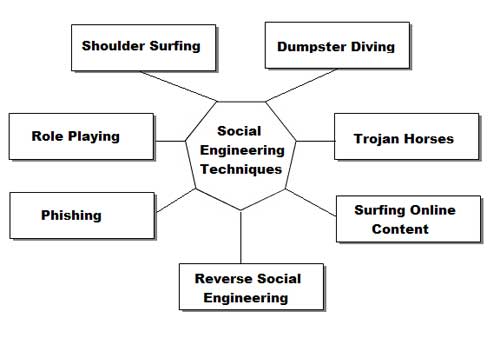
This FAQ will address phone techniques, mail techniques, internet techniques and live techniques. I will discuss Equipment and will put some scripts of actual conversations from social engineering. There are times I might discuss things that cross the line into phreaking or traditional hacking. Don't send me email and say that my terms aren't correct and blahblahblah isn't social engineering. I use them for convenience and lack of
better methods of explanation (eg I might say "dumpster diving is a form of social engineering") Don't get technical.

Basics
This is probably the most common social engineering technique. It's quick, painless and the lazy person can do it. No movement, other than fingers is necessary. Just call the person and there you go. Of course it gets more complicated than that.

What Equipment is necessary for this?
The most important peice of hardware is your wetware. You have to have a damn quick mind. As far as physical Equipment goes, a phone is necessary. Do not have call waiting as this will make you sound less believeable. There is no real reason why this does but getting beeped in the middle of a scam just
throws off the rhythym. The phone should be good quality and try to avoid cordless, unless you never get static on them. Some phones have these great buttons that make office noise in the background. Caller ID units are helpful if you pull off a scam using callback. You don't want to be expecting your girlfriend and pick up the phone and say, "I wanna fuck you" only to find out it was an IBM operator confirming your
identity. Operators don't want to have sex with you and so your scam is fucked. Besides, call ID units are just cool because you can say, "Hello, <blank>" when someone calls. The Radio Slut carries these pretty cheap.
Something I use is a voice changer. It makes my voice sound deeper than James Earl Jones or as high as a woman. This is great if you can't change your pitch very well and you don't want to sound like a kid (rarely helpful). Being able to change gender can also be very helpful (see technique below). I got one for a gift from Sharper Image. This means that brand will cost quite a bit of cash, but it's very good quality. If anyone knows of other brand of voice changers, please inform me.

Phreaking and Social engineering? 
Social Engineering and phreaking cross lines quite a lot. The most obvious reasons are because phreaks need to access Ma Bell in other ways but computers. They use con games to draw info out of operators.
Redboxing, greenboxing and other phreaking techniques can be used to avoid the phone bills that come with spending WAAAAYYY too much time on the phone trying to scam a password. Through the internet, telnetting to california is free. Through ma bell, it's pricey. I say making phone calls from payphones is fine, but beware of background noise. Sounding like you're at a payphone can make you sound pretty  unprofessional. Find a secluded phone booth to use.

How do I pull off a social engineering with a phone?
First thing is find your mark. Let's say you want to hit your school. Call the acedemic computer center (or its equivelent). Assuming you already have an account, tell them you can't access your account. At this point they might do one of two things. If they are stupid, which you hope they are, they will give you a new password. Under that precept, they'll do that for most people. Simply finger someone's account, specifically a faculty member. At this point, use your voice changer when you call and imitate that teacher the best you can. People sound different over the phone, so you'll have a bit of help. 
Try to make the person you're imitating a female (unless you are a female). Most of the guys running these things will give anything to a good sounding woman because the majority of the guys running minicomputers are social messes. Act like a woman (using voice changer) and you'll have anything you want from them. 
Most of the time the people working an area will ask for some sort of verification for your identity, often a social security number. You should find out as much information about a mark as you can (see mail and live
techniques) before you even think about getting on the phone. If you say you are someone you aren't and then they ask you for verification you don't have, they will be suspicious and it will be infinitely more difficult to take that system.
Once again for idiots: DO NOT TRY TO SOCIAL ENGINEER WITHOUT SUFFICIENT INFORMATION ON YOUR MARK!
Once people believe you are someone, get as much as you can about the system. Ask for your password, ask for telnet numbers, etc. Do not ask for too much as it will draw suspicion.You must sound like a legitimate person. Watch your mark. Learn to speak like him/her. Does that person use contractions? Does that person say "like" a lot? Accent? Lisp? 
The best way for observation of speech is to call the person as a telemarketer or telephone sweepstakes person. Even if they just tell you they can't talk to you, you can learn a quite a bit from the way they speak. If
they actually want to speak to you, you can use that oppurtunity to glean information on them. Tell them they won something and you need their address and social security number and other basic info. 
WARNING: ABUSING SOMEONE'S SOCIAL SECURITY NUMBER IS ILLEAGAL!!!
DON'T SAY YOU WEREN'T WARNED!!!

 
Twitter Bird Gadget