Search In Site

Showing posts with label Internet Tricks. Show all posts

11 January, 2014

Be Online at Various Accounts at Once

The Best way to Connect to facbook, Google, Yahoo, Twitter and Skype Contacts at Once. Hi Friends This Is Not A trick It is Service Provided By Microsoft. With The Microsoft Account You CAn Connect to Various Social site and chat with your friends easily. You don't need to sign in Seperately. 
Microsoft Account Provide the Service to Import all your emails from another account(E.g: gmail ) to here. It Can connect you to Facebook, Twitter, Linkedin, Google, Skype etc. It means you can make chat with your friends on Facebook, Google, Twitter, Linkedin, And Skype.

For this You Need A Microsoft Account 
Simply Goto the Address http://outlook.com. Create An Account and Login. After Login You Can See A Down Arrow alongwith Outlook as Shown In the Fig.


Click On It And Select The People Tab.
Here you can add contacts on facebook twitter skype etc.
After it. you will be Available online on Facebook and others in which you connect.
Below Is The Preview of my outlook account and at right side is the live chat area.


08 August, 2013

shop online without a credit card

There are good reasons not to use a credit card online--or at all. Shopping online increases the odds that someone will steal your credit card number. You may want to make a purchase without your spouse knowing about it. And the buy-now-pay-later aspect of credit cards encourage some people to dangerously overspend.
But the online economy is very much a credit card economy. If you're going to buy a song, book, tablet, or just about anything online, you'll be expected to enter a credit card number.

Before we get to the good options, let's discuss an obvious but very bad one: your ATM card. Sure, it has a 16-digit number and can be used as a credit card. But it's a debit card, with the money coming out of your bank account immediately with each charge. If a thief gets your number, he or she could empty your account before you know what happened. Not so with a real credit card, where you pay nothing until you see the monthly bill and can challenge suspicious charges.

Instead, ask your bank to set you up with a secondary account for online purchases, and keep only a small amount in that account. The account would need its own ATM card, with its own credit card number. Just make sure this account lacks overdraft protection; you don't want money moving automatically from your real account into this one.

Another option: Sign up for Paypal, connecting it to your bank account. Not all retail sites support Paypal, but the payment service can give you a debit card that you can use in place of a credit card.

Finally, you can use gift cards, which you can buy at old-fashioned brick-and-mortar stores. You can even buy these with cash.

I checked my local Safeway, and found gift cards for various pre-paid amounts for Amazon, Barnes & Noble, Ebay, Hulu Plus, iTunes, and others. They also sell pre-paid Visa cards, which you could purchase for any amount between $20 to $500. The Visa cards come with a $4 purchase charge; the retailer-specific cards cost nothing beyond the shopping power of the card..

01 August, 2013

Protect your children using internet filter software

According to TopTenREVIEWS Google Analytics data reveals a dramatic increase – indeed a 4,700% jump – in searches for the term "porn" in the days immediately following the end of school for most students. While falling short of scientific proof, it's a strong indicator of what many youngsters may be doing on their summer vacation.
There could be many explanations for this dramatic change in numbers, but there is no question it coincides with the time most schools get out.
Since parents are busy and cannot constantly stand guard over computer use, a little electronic help might come in handy. Internet filter software can offer some reassurance to parents that their children are protected from material that parents deem objectionable.
The internet filter software on the market today allows parents to block websites and chat rooms that parents deem inappropriate. This software can do much more including such things as filtering emails, monitoring social media sites and sending parents email alerts if someone using a computer is accessing objectionable content.
Academic studies have shown that young people who are exposed to sexually explicit material before age 18 are more likely to become promiscuous, get pregnant, test positive for a sexually transmitted disease and engage in forced sex.
Nothing takes the place of heart-to-heart talks between parents and children about values, human sexuality and the things that are considered healthy, respectful and worthwhile according to a particular family’s principles.
However, internet filter software can shield children from images, language, videos and other depictions of behaviors that are contrary to the parents’ standards. It could be another tool to help parents get involved in the already complicated task of trying to raise healthy, well-adjusted children.
Dr. Mary Anne Layden, director of the Sexual Trauma and Psychopathology Program,
Center for Cognitive Therapy in the Department of Psychiatry at the University of Pennsylvania, is the author of “The Social Costs of Pornography: A Statement of Findings and Recommendations.”
"There is evidence that the prevalence of pornography in the lives of many children and adolescents is far more significant than most adults realize, that pornography is deforming the healthy sexual development of these young viewers, and that it is used to exploit children and adolescents,” Layden wrote.

How does it deform them?
In a telephone interview, Layden said academic studies show that there are 23 unhealthy behaviors that people exposed to "sexualized media" before the age of 18 are more likely to display. These can include a greater likelihood to have sex earlier in life, have multiple partners, engage in forced sex, test positive for Chlamydia, be more accepting of sexual harassment and become juvenile offenders.
“Are any of those things the kind of things we want for our kids?” Layden said. “My own research shows that pornography is mis-education about sex. It lies about sex.”
For example, she said pornography shows that women love to be degraded and violently hurt, which is not true in real life. It also depicts men as vicious, narcissistic and out of control – which is also not true, she said.
“This is hate speech against men and hate speech against women,” Layden said. “It sends the wrong message about people, relationships and functions. Porn doesn’t say anything about love or commitment or caring. It also doesn’t say anything about producing children.”
The blunt-talking and often controversial Layden said she tells parents, “You’ve got to say to children: ‘There won’t be any porn in this home’” and then take strong measures to keep it away from impressionable youngsters.
“It’s good to talk to the kids, but I think prevention is 100 percent better,” Layden said.

With Internet filter softwares you can
Block web sites in more than 70 categories, including pornography, gambling, drugs, violence/hate/racism, malware/spyware, phishing
Force SafeSearch on all major search engines
Set time restrictions to block web access during designated times
Configure custom lists for "always allow" and "always block"
Override a web page block with password
Trust the enhanced anti-tampering, even children can't break
View easy reports to monitor and control web activity
Real-time categorization of new adult and malicious sites

Copy from Right Click Disabled Blog or Websites

Copy-pasting some body else work is very common. Though, very few people actually give the credit link or mention about the source. Specially, in Blogging people copy each other content and increase plagiarism. Apart from all Auto-bloggging tool, most common form of copying a page is by selecting text > mouse right-click and copy the content. Though in WordPress, we can easily disable this by using disable right click WordPress plugin. Though according to me right click gives a bad user experience and for Bloggers, you can always fight such copy-paste blogger using Google DMCA.
Now for me, when I have to write a tutorial, I take information from the pages on Internet and give proper credentials with link in the post. Now, the problem which I have faced recently is many of these sites have right click disabled and it’s pain to copy from these sites normally. So, here I have compiled a series of possible ways to copy content from those pages. FYI, many websites disable CTRL +C options to ensure better security from hackers and malicious sites.

Method to copy text from Right click Disabled pages:
1.Most of the bloggers and webmasters uses JavaScript technique to disable right-click, to prevent scrapers sites from stealing their content.
Many times we often come to websites where we found contents useful like how-to , Guides and we copy it into worded or notepad. Generally we select some text and then right click to copy. But on Protected sites a message box appears saying “Right-Click on this site is disabled. Hold Ctrl key and click on link to open in new tab”
But there are numerous way through one can copy contents from Right Click protected sites

2.By disabling browser JavaScript in browser And Using Proxy
Disabling JavaScript in Browsers
In Chrome browser, you can quickly disable JavaScript by going to settings. See the screenshot for better explanation:
Goto Setting >> UnderHood Tab >> Content Settingsor enter chrome://settings/content
Then Select Do not allow any site to run JavaScript
Similarly if you are using Firefox, you can remove the tick from “Enable JavaScript” option.
Using Proxy
There are many proxy sites, which let you disable JS while browsing. All you need to use those proxy sites, which offer such features and you can quickly use right-click on click disabled sites.
If you have to copy the specific text content and you can take care of HTML tags, you can use browser view source options. All the major browser give an option to source of the page, which you can access directly using the format below or by right click. Since, right click is out of question here, we will simply open chrome browser and type: view-source: before the post URL Like
And find the paragraph or text you want to copy and then paste it into any text editor.
Well, using this trick ethically or unethically is in user hand but for a normal blogger like me and you, this tip will certainly help.

3.Visit that webpage.
Press Ctrl+S on your keyboard.
Save the webpage anywhere on your computer.
Now open the downloaded webpage. You can copy or you can do anything.

OR
If Not Work Then Save it And Rename As .docx
Open It With Ms-Word
Now Copy The Whole Text .

27 July, 2013

How to create an Apple ID without a Credit card

A US-based Apple ID is highly useful to access majority of the contents from a iTunes Store because US Citizens are offered exclusive access to some of the best apps, movies and music, which are generally not made available to people from other countries of the world.
A US based Apple ID has access to a large volume of content on iTunes Store, and a Credit Card is required for that.
An Apple ID is required to download/purchase content from iTunes store. Apart from paid music/movies Itunes has a large library of free podcasts, apps etc, which requires you to be logged in before downloading.
Normally, anyone can create a Apple ID by registering for one from iTunes.

American or US-based Apple ID has a lot of advantages. Lots of free apps like Google Earth, Pandora, Adobe Ideas etc., are US – exclusive, but free apps. If you try to download them, iTunes will show you an error message. So, if you have a US-based ID, you can download almost every other free App from the store.

Here is what you should be doing to get hold of a US based ID without credit card :
1. Go to iTunes. Then, Go to the iTunes Store. Get yourself the latest iTunes 11, because of its latest features and better Interface.Do not log in with any kind of account. Just scroll below to the bottom, and click the “Change Country” link. You can also click the round flag at the bottom right corner.
2. Change the country to United States.
3. Go to the free apps section from the App Store >> Great Free iPhone Apps. Just select any option and click to download the Application (don’t worry, you don’t need a iphone for this)
4. Now, in the Sign Up Section
In the First page, click “continue“.
In the Second Page, accept the terms by checking the box and then click “Agree“
In the third page, fill your details. enter anything you like. Click “continue” afterwards.
You will finally reach the fourth page, where actual payment details are taken.
5. You can see the “None” as the payment option. Just make sure that you have selected it. Enter some dummy address into the details below and click “Create Apple ID“. It will send you a verification mail to your e-mail address and make sure you verify it.
That’s it. You now have a US-based Apple ID created, which you can use to download great free apps and books for your device.
FYI : These are the dummy details I have used :
Title : Mr
First name : Brad ; Last name : Pitt
Street : qwerty ; Apt : asdfg
City : ny
State : NY
Zip : 10006
Area Code : 123
Phone : 1234567

6. And Last Just Verify Your Email and Enjoy

play entire Youtube Playlist in VLC

You might be knowing the fact that one can play a streaming video from youtube inside your VLC media player. But, playing a Youtube video playlist in VLC player is also possible.
Playing an entire youtube playlist in VLC offers much better viewing experience, allowing you to play the public playlists of specific genres.
You can play the video’s as a list, without opening your browser at all, and also this video is exactly similar to any other video playing in VLC, so one can stop, play in a loop, take a snapshot etc.
To enable all this, this is what you have to do :
1. Download the .lua file, which allows you to play a playlist.
Download: The VLC .lua file

2. Now open the VLC installation folder (C:\Program Files (x86)\VideoLAN\VLC\lua\playlist) and move the .lua file into this folder.
3. Open/restart your VLC player and select Media–>Open Network Stream. Paste the link of any Public Youtube playlist into the box to start playing the videos.
Benefits :
You can play entire movies available in Youtube, without any ads or additional links.
You can also play Playlists from Dailymotion.

How To Remove IDM completely from your System

Uninstall and Remove Internet Download Manager completely from your system without formatting.
If anyone of you has encountered seeing this image, then you must read this article till the end.
Whenever you exceed the time beyond trial version or update a pirated version of the software using a fake key, you will be encountered with this situation.
Users addicted to IDM may start mourning whenever they see such notification, because the only method known to get rid of corrupt IDM is formatting the entire disk. IDM is a stubborn software which cannot be got rid off easily. The Registry Values stay in your system despite uninstalling the software, and prevent you from installing a new copy of the software. The problem lies in hunting those registry values.
Its a MYTH that you need to format the entire disk. You need to change the registry values and there is a program which can just do that. Follow the following steps to uninstall IDM from your System .
First of all, go to C:\Program Files (x86)\Internet Download Manager (default location), or wherever it’s installed in your system. Run the small application titledUninstall from the folder. This will basically remove the program from your System. Your will reboot after Uninstalling.
Completely delete even the Internet Download Manager folder from the Program Files section.
Now you need to get rid of the Registry Values. Now Download the Unregister IDMprogram, I found this amazing little piece of program while scourging for methods to get rid of IDM. After Uninstalling, extract this program and simply double-click and run Unregister IDM.
This will get rid of the existing and previous installations of IDM completely from your System. Isn’t it a great piece of news? You did not have to format your entire disk at all for a simple but stubborn program like IDM.

20 July, 2013

Increase bittorent download Speed


The latest file sharing protocol bittorrent has modified everything when it comes to file sharing. It is a nice platform for downloading large files. Sharing of files include movies, iso images and MP3 songs. Bittorent is mainly famous for illegal file sharing .
The Bittorrent system can be slow at times due to heavy traffic. so let us tweak bittorrent sharing program a little bit.
There are a lot of different bittorrent clients that you can download. I think the best are BitCommet and uTorrent.
Here is a few tips to speed up uTorrent Client. Similar can be implemented on any other torrent clients ,which you are using.
 Step 1: Increase TCP connections
You need to increase the number of TCP connections that are allowed at max.Windows XP Service Pack 2 came with the number of allowed open connections to 10. This is to stop any piece of spyware(in our case bittorent client even) from totally taking over your internet connection. TCP connection allowed should be 50 for optimal performance. The best way to increase the maximum number of connections is to apply patch that is available at www.lvllord.de. A nice way to fix this is to download this patch .
The little tweak to the torrent client works great in certain times. If you’re using uTorrent go to Options menu then Preferences. In the Preferences go the Advanced Options. In the advanced options change the net.max_halfopen connections to 80. In the same section change the max half open tcp connections to 80. Once your done click on OK and you are all set. This tweak will let the maximum TCP connection available for the bittorrent client. Now start downloading you’ll realize a little difference in the download speed. Port forwarding technique is more effective than this.
A third point of interest is that some “windows updates” revert your tweaked tcp connections back to 10. So it’s wise to check this every now and then. You can check this by going to (in windows xp) Start > Control Panel > Administrative Tools > Event Viewer > System… Look for event 4226 (sort by event).
If there are a lot of daily occurrences it’s likely that the max amount of half-open tcp connections was set back to 10. Or you’re infected with some nasty spy ware…
 Step 2:Torrent Client Configuration
In order to apply these tips you must know your maximum up- and download speed. You can test your bandwidth over here (stop all download activity while testing).
Settings 1-4 can be found in the options, settings or preference tab of most torrent clients.
1. Maximum upload speed 
Probably the most important setting there is. Your connection is (sort of) like a pipeline, if you use you maximum upload speed there’s not enough space left for the files you are downloading. So you have to cap your upload speed.
Use the following formula to determine your optimal upload speed…
80% of your maximum upload speed
so if your maximum upload speed is 40 kB/s, the optimal upload rate is 32kB/s But keep seeding!

Make free Calls From Computer To Mobile Anywhere

You can now make free calls from your pc to any mobile in the world. All you need is a mic with ear phones, a decent internet connection and Yahoo Messenger or Skype Installed.I’m now using this free call method and the great thing is that, this trick can be used to make unlimited call to mobiles all over the world and not limited to United states. It even works to make free local mobile calls in India.
So how do we make a call from pc to mobile phone for free?
Install Yahoo messenger or Skype. In case you don’t have it Google it and download the latest version.
Sign into your yahoo messenger or Skype using your yahoo id and password. Configure your microphone and headset if you have installed a fresh yahoo or skype software
Inside your Yahoo messenger dial +18003733411 and press enter
Now a small window pops up like the one shown below.
An operator greets you with a recorded welcome message along with an advertisement and asks you to select one of the Free411 service. Just hear the services options until they say the last one as “Free Call”. When you hear this, don’t press any number on your keyboard and instead SAY “Free call” loudly on your microphone connected to your PC.
After this voice message is detected by their system, they will run a short advertisement of their sponsor and make sure you don’t press any number at this time.
WAIT UNTIL YOU HEAR A BEEP SOUND after the following message “Please dial the phone number country code first, don’t forget to dial 1 for north America”
After you hear this message ,immediately dial the destination number of your choice along with the country code.(e.g. for north America it’s 1 and for India it’s 91)
Your call will get connected and you can talk for 7 minutes continuous for free. When it gets disconnected, repeat the same procedure again. You can make multiple and unlimited calls with this service.
It was never easy to make a free international call like this before.
So what’s the catch?
FREE411 service toll-free number is based in USA. This company gets paid for the advertisements from sponsors.
Are there any limits on the number of call which we can make?
There is no limit on the number of free calls which can be made through this system.

20 June, 2013

How To Create a Simple Search Engine In PHP


Before we actually make the search engine, we need to create a basic webpage that will have an input field where the user can enter his or her search query. I'm going to keep mine simple; feel free to make an elaborate one with lots of bells and whistles. The code for my page is below:
<html> 
<head>
<title>Simple Search Engine version 1.0</title> 
</head> 
<body> 
<center> 
Enter the first, last, or middle name of the person you are looking for: <form action="search.php" method="post"> 
<input type="text" name="search_query" maxlength="25" size="15"><br> 
<input type="reset" name="reset" value="Reset"> 
<input type="text" name="submit" value="Submit"> 
</form> 
</center>
 </body>
 </html>


It's a pretty basic page so I'm not going to explain alot of it. Basically, the user will enter the first, middle, or last name of the person they are looking for and hit enter. The contents of the input field will be passed to a php script named “search.php” which will handle the rest.
Now that the page is out of the way, let's create the actual script. First, we need to connect to the database using mysql_pconnect() and select the table using mysql_select_db(). Next, we want to parse the value passed to the script to see if it contains any invalid input, such as numbers and funky characters like #&*^. You should always validate input, don't rely on things like JavaScript to do it for you, because once the user disables JavaScript all that fancy validation goes down the toilet. To check the input we are going to use a regular expression, they are a bit confusing and will be explained in a later tutorial. For now, all you need to know is that it will check to see if value passed is a string of characters. All right, enough chatter, here is the first part of the script:
<?php mysql_pconnect("host", "username", "password") or die("Can't connect!"); mysql_select_db("Names") or die("Can't select database!"); if (!eregi("[[:alpha:]]", $search_query)) { echo "Error: you have entered an invalid query, you can only use characters!<br>"; exit; }
Now that we've done that, we will form the search query.
$query= mysql_query("SELECT * FROM some_table WHERE First_Name= '$search_query' OR Middle_Name= '$search_query' OR Last_Name= '$search_query' ORDER BY Last_Name");
Look confusing? I'll explain, what's happening is, we're asking MySQL to search all the rows in First_Name, Middle_Name, and Last_Name for a match to the query entered by the user; then, take the results of that search, alphabetize the results by Last_Name.
The rest of the coding from now on is a breeze. We will get the results from the query using mysql_fetch_array( ), and check to see if there is a match using mysql_num_rows(). If there is a match, or matches, we will output it along with the number of matches found; if there isn't, we'll report to the user that we couldn't find anything.
$result= mysql_num_rows($query); if ($result == 0) { echo "Sorry, I couldn't find any user that matches your query ($search_query)"; exit; } else if ($result == 1) { echo "I've found <b>1</b> match!<br>"; } else { echo "I've found <b>$result</b> matches! <br>"; } while ($row= mysql_fetch_array($query)) { $first_name= $row["First_Name"]; $middle_name = $row["Middle_Name"]; $last_name = $row["Last_Name"]; echo "The first name of the user is: $first_name.<br>"; echo "The middle name of the user is: $middle_name.<br>"; echo "The last name of the user is: $last_name.<br>"; } ?>
I added that extra if statement so that when we report how many users we've found, its output will be in proper English. If I we don't, the script will echo "I've found 1 matches" which obviously isn't good grammar :P The rest of the script loops through the results and prints them to a webpage. That's all, we've finished the script! The entire script is included below:
<html> <head> <title>Simple Search Engine version 1.0 - Results </title> </head> <body> <?php mysql_pconnect("host", "username", "password") or die("Can't connect!"); mysql_select_db("Names") or die("Can't select database!"); if (!eregi("[[:alpha:]]", $search_query)) { echo "Error: you have entered an invalid query, you can only use characters!<br>"; exit; //No need to execute the rest of the script. } $query= mysql_query("SELECT * FROM some_table WHERE First_Name='$search_query' OR Middle_Name= '$search_query' OR Last_Name='$search_query' ORDER BY Last_Name"); $result= mysql_numrows($query); if ($result == 0) { echo "Sorry, I couldn't find any user that matches your query ($search_query)"; exit; //No results found, why bother executing the rest of the script? } else if ($result == 1) { echo "I've found <b>1</b> match!<br>"; } else { echo "I've found <b>$result</b> matches!<br>"; } while ($row= mysql_fetch_array($query)) { $first_name= $row["First_Name"]; $middle_name = $row["Middle_Name"]; $last_name = $row["Last_Name"]; echo "The first name of the user is: $first_name.<br>"; echo "The middle name of the user is: $middle_name.<br>"; echo "The last name of the user is: $last_name. <br>"; } ?> </body> </html>

It's All Done !!!

17 June, 2013

How To Get Top Ranking For Website


The tutorial is all about getting your site listed on top in Search Engines i.e Search Engine Optimization
First thing you need to do is find the keywords you want to optimize for.
There is great tool by Overture (/http://inventory.overture.com/d/sea...ory/suggestion/)
But I would suggest using this free tool called GoodKeywords (/http://www.goodkeywords.com/products/gkw/)
This one does the same job as Overture does but it also supports other Search Engines (Lycos and Teoma etc..)
For example if you want to optimize for the keyword "tech news", just search for the keyword in any of the tools specified above... It would show you keywords related to that and not of the searches..
Pick the keywords which are related to your site.
For example when you search for "Tech News" you'll see the following results:
Count Search Term
11770 tech news
351 itt news tech
191 high tech news
60 news tech texas
49 computer tech news
42 bio news tech
34 in itt news tech
30 news tech virginia
29 asia news tech
25 hi tech news
25 sci tech news
Now see what other terms are related to your keyword technology news
Do couple of searches like that and note down around 15-20 keywords.
Then, keep the keywords which are searched most on the top.
Now you need Title Tag for the page.
Title tag should include top 3 keywords, like for "tech news" it can be like :
"Latest Tech News, Information Technology News and Other computer raleted news here."
Remember that characters should not be more than 95 and should not have more than 3 "," commas - some search engines might cosider more than 3 commas as spam
Now move on to Meta Tags
You need following Meta Tags in web page
<META http-equiv="Content-Type" content="text/html; charset=iso-8859-1">
<META name="keywords" content="keyword1,keyword2,keyword3">
<META name="description" content="brief description about the site">
<META name="robots" Content="Index,Follow">
No need to have other meta tags like abstract, re-visit and all, most people dont read it.
Now...
<META http-equiv="Content-Type" content="text/html; charset=iso-8859-1">
This tag is tells content type is html and character set used it iso-8859-1 there are other character sets also but this is the one mosty used..
<META name="keywords" content="keyword1,keyword2,keyword3">
This one should have all your keywords inside starting from keyword with most counts...
keyword tag for our example would be something like :
<META name="keywords" content="tech news,technology news, computer technology news,information technology,software news">
Remember to put around 15-20 keywords max not more than that. Dont repeat keywords or dont put keywords like, "tech news", "info tech news", "latest tech news" and so on...
<META name="description" content="brief description about the site">
Provide short decription about your site and include all the keywords mentioned in the title tag.
Decription tag should be:
<META name="description" content="One Stop for Latest Tech News, Information Technology News, Computer Related and Software news.">
It can be upto 255 characters and avoid using more than 3 "," commas
<META name="robots" Content="Index,Follow">
This is used for search robots..following explanation will help you :
index,follow = index the page as well as follow the links
noindex,follow = dont index the page but follow the links
index,nofollow = index the page but dont follow the links
noindex,nofollow = dont index page, dont follow the links
all = same as index,follow
none = same as noindex,nofollow
Now move on to body part of the page
Include all top 3 keywords here,
I would suggest to break the keyword and use it...
For example
YourSiteName.com one stop for all kind of Latest Tech News and Computer Related information and reviews.................
Include main keywords in <h#> tags <h1><h2> etc..
and start with <h1> and then move to <h2> <h3> etc..
<h1> tag will be too big but CSS can help you there, define small font size in css for H1,H2,... tags
When done with page copy, then you need to provide title and alt tags for images and links.
Use some keywords in the tags but dont add all the keywords and if not neccessary then dont use keywords in it, basically it should explain what is image all about.
Remember to add Top keyword atleast 4 times in the body and other 2 keywords thrice and twice respectively.
Now move on to Footer Part
Try to include top keywords here and see the effect, use site keywords as links i.e.
<a href="news.php">Tech News</a> <a href="software-news.php">Software News</a> etc..
Now finally, you need to read some more stuff..may be you can all it as bottom lines...
Site Map - This is page where you need to put all the links present in your site, this is will help Search Engines to find the links easily and also provide link for site map in footer, as search engines start scanning the page from bottom.
Robots.txt - This file contains address of directories which should not be scanned by search engines.. more info can be found here : /http://www.robotstxt.org/wc/exclusion.html search engines line google, yahoo ask for robots.txt file.
Valid HTML - Your code should have valid html and doc type, Its kind of diffucult to follow all the standards but you can atleast open and close all the tags properly, you can check your page's html online here : /http://validator.w3.org/ or you can use this free software called HTML Tidy : /http://tidy.sourceforge.net/
All done now, you just need to check your site with this script, its called SEO Doctor : /http://www.instantposition.com/seo_doctor.cfm
It'll show you the report of your site with solution.
Now, correct the errors and start submitting the site :
Start with google : /http://google.com/addurl.html
then yahoo : /http://submit.search.yahoo.com/free/request
then move to altavista,alltheweb and other search engies..
Also submit your site to direcories like /http://dmoz.org , /http://jayde.com etc...
Dmoz is must, as google, yahoo and may more search engines uses same directory
And remember, dont try to SPAM with keywords in these directories, dmoz is handled by Human Editors
Submitted the sites, but still i cant see you site on top?
Wait for sometime may be a month or so but keep an eye on your search term, use /http://GoogleAlert.com - this will show whenever google updates for your keywords, it will mail you the new results.
And also check whether your site is listed on google..
use this tool called Google Monitor, it can be downloaded for free from : /http://www.cleverstat.com/google-monitor.htm

14 June, 2013

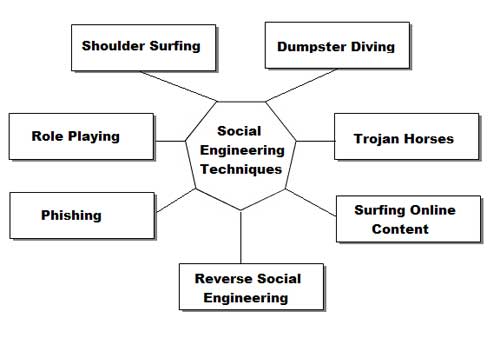
SOCIAL ENGINEERING - An Overview

What is social engineering?
Social Engineering: n.  Term used among crackers and  samurai for cracking techniques that rely on weaknesses in  wetware rather than software; the aim is to trick people into revealing passwords or other information that compromises a target  system's security.  Classic scams include phoning up a mark who has  the required information and posing as a field service tech or a fellow employee with an urgent access problem. 
This is true. Social engineering, from a narrow point of view, is basically phone scams which pit your knowledge and wits against another human. This technique is used for a lot of things, such as gaining passwords, keycards and basic information on a system or organization.

Why is there a FAQ about it?
Good question. I'm glad I asked. I made this for a few reasons. The first being that Social Engineering is rarely discussed. People discuss cracking and phreaking a lot, but the forum for social engineering ideas is
stagnant at best. Hopefully this will help generate more discussion. I also find that social engineering specialists get little respect, this will show ignorant hackers what we go through to get passwords. The last reason is honestly for a bit of Neophyte training. Just another DOC for them to read so I don't get bogged with email.

Who Cares?
To Neophytes: You should, you little fuck. If you think the world of computers and security opens up to you through a keyboard and your redbox then you are so fucking dead wrong. Good. Go to your school, change your grades and be a "badass" hacker. Hacking, like real life, exists in more than just your system. You can't use proggies to solve everything. I don't mean to sound upset, but jesus, have a bit of innovation and a sense of adventure.
To Experienced Hackers: Just thought it would help a bit.

Basic intro and shit for this document.
This FAQ will address phone techniques, mail techniques, internet techniques and live techniques. I will discuss Equipment and will put some scripts of actual conversations from social engineering. There are times I might discuss things that cross the line into phreaking or traditional hacking. Don't send me email and say that my terms aren't correct and blahblahblah isn't social engineering. I use them for convenience and lack of
better methods of explanation (eg I might say "dumpster diving is a form of social engineering") Don't get technical.

Basics
This is probably the most common social engineering technique. It's quick, painless and the lazy person can do it. No movement, other than fingers is necessary. Just call the person and there you go. Of course it gets more complicated than that.

What Equipment is necessary for this?
The most important peice of hardware is your wetware. You have to have a damn quick mind. As far as physical Equipment goes, a phone is necessary. Do not have call waiting as this will make you sound less believeable. There is no real reason why this does but getting beeped in the middle of a scam just
throws off the rhythym. The phone should be good quality and try to avoid cordless, unless you never get static on them. Some phones have these great buttons that make office noise in the background. Caller ID units are helpful if you pull off a scam using callback. You don't want to be expecting your girlfriend and pick up the phone and say, "I wanna fuck you" only to find out it was an IBM operator confirming your
identity. Operators don't want to have sex with you and so your scam is fucked. Besides, call ID units are just cool because you can say, "Hello, <blank>" when someone calls. The Radio Slut carries these pretty cheap.
Something I use is a voice changer. It makes my voice sound deeper than James Earl Jones or as high as a woman. This is great if you can't change your pitch very well and you don't want to sound like a kid (rarely helpful). Being able to change gender can also be very helpful (see technique below). I got one for a gift from Sharper Image. This means that brand will cost quite a bit of cash, but it's very good quality. If anyone knows of other brand of voice changers, please inform me.

Phreaking and Social engineering? 
Social Engineering and phreaking cross lines quite a lot. The most obvious reasons are because phreaks need to access Ma Bell in other ways but computers. They use con games to draw info out of operators.
Redboxing, greenboxing and other phreaking techniques can be used to avoid the phone bills that come with spending WAAAAYYY too much time on the phone trying to scam a password. Through the internet, telnetting to california is free. Through ma bell, it's pricey. I say making phone calls from payphones is fine, but beware of background noise. Sounding like you're at a payphone can make you sound pretty  unprofessional. Find a secluded phone booth to use.

How do I pull off a social engineering with a phone?
First thing is find your mark. Let's say you want to hit your school. Call the acedemic computer center (or its equivelent). Assuming you already have an account, tell them you can't access your account. At this point they might do one of two things. If they are stupid, which you hope they are, they will give you a new password. Under that precept, they'll do that for most people. Simply finger someone's account, specifically a faculty member. At this point, use your voice changer when you call and imitate that teacher the best you can. People sound different over the phone, so you'll have a bit of help. 
Try to make the person you're imitating a female (unless you are a female). Most of the guys running these things will give anything to a good sounding woman because the majority of the guys running minicomputers are social messes. Act like a woman (using voice changer) and you'll have anything you want from them. 
Most of the time the people working an area will ask for some sort of verification for your identity, often a social security number. You should find out as much information about a mark as you can (see mail and live
techniques) before you even think about getting on the phone. If you say you are someone you aren't and then they ask you for verification you don't have, they will be suspicious and it will be infinitely more difficult to take that system.
Once again for idiots: DO NOT TRY TO SOCIAL ENGINEER WITHOUT SUFFICIENT INFORMATION ON YOUR MARK!
Once people believe you are someone, get as much as you can about the system. Ask for your password, ask for telnet numbers, etc. Do not ask for too much as it will draw suspicion.You must sound like a legitimate person. Watch your mark. Learn to speak like him/her. Does that person use contractions? Does that person say "like" a lot? Accent? Lisp? 
The best way for observation of speech is to call the person as a telemarketer or telephone sweepstakes person. Even if they just tell you they can't talk to you, you can learn a quite a bit from the way they speak. If
they actually want to speak to you, you can use that oppurtunity to glean information on them. Tell them they won something and you need their address and social security number and other basic info. 
WARNING: ABUSING SOMEONE'S SOCIAL SECURITY NUMBER IS ILLEAGAL!!!
DON'T SAY YOU WEREN'T WARNED!!!

07 June, 2013

What Is Keylogger ?

Here is a DETAILED tutorial which contains every possible information that you need to know about keyloggers which includes how to use it, how it works etc.


WARNING: I highly recommend that you read this post completely since every single piece of information is important.
I know most of you are new to the concept of keyloggers. For some of you, this might be the first time you heard about the term “keylogger”. So to give you a clear picture and make you understand better I would like to take up this post in the form of FAQs (Frequently Asked Questions). Here we go…

1. What is a Keylogger?
A keylogger (also called as spy software) is a small program that monitors each and every keystroke a user types on a specific computer’s keyboard. A keylogger program can be installed just in a few seconds and once installed you are only a step away from getting the victim’s password.

2. How Keylogger works?
Once the keylogger is installed on a PC, it starts operating in the background (stealth mode) and captures every keystroke of the victim on that PC. Let’s take up a small example: The victim goes to http://mail.yahoo.com and types his “username” and the “password” in the respective fields to login. The keylogger silently records these keystrokes and stores them in the logs. These logs when opened up shows the captured “username” and “password” and will also tell you that they were typed in the Yahoo login page. Thus the keylogger loads upon every startup, runs in the background and captures each and every keystroke.

3. How to install the keylogger?
A keylogger can be installed just like any other program. Just follow the screen instructions and you’re done.

4. Do I need any special knowledge to install and use the keylogger?
Absolutely NOT! Anyone with a basic computer knowledge can install and use the keylogger. It requires no special skills.

5. Once I install the keylogger can the victim come to know about it’s presence?
No. The victim will never come to know about the presence of the keylogger on his/her computer. This is because, once installed the keylogger will run in total stealth mode. Unlike other programs it will never show up in start-menu, start-up, program files, add/remove programs and task manager. So the victim can no way identify it’s presence on his/her PC.

6. Can I be traced back if I install the keylogger on some other computer?
No, it’s almost impossible to trace back to you for installing the keylogger on other’s PC.

7. Which keylogger is the best?
Today there exists hundreds of keyloggers on the market and most of them are no more than a scam. So I tested some of the top keyloggers and conclude that the following is the best one.
SniperSpy

8. How SniperSpy works?
I will try to explain the working of Sniperspy in simple steps.
1. After you purchase Sniperspy, you’ll be able to create the installation module using easy set-up program. You need to email this module to the remote user as an attachment.
2. When the remote user runs the module it’ll get installed silently and monitoring process will begin. The keystrokes are captured and uploaded to the SniperSpy servers continously.
3. You can login to your Sniperspy account (you get this after purchase) to see the logs which contains the password.

9. I don’t have physical access to the traget computer. Can I still use SniperSpy?
Yes you can. SniperSpy supports REMOTE INSTALLATION feature which allows you to remotely install the program on any PC even if you have no physical access to it. For remote installation all you need to do is just place the module (refer FAQ-8) in a .zip/.rar file and send it as an attachment to the target email address (for which you need the password).

10. Can I install SniperSpy on a local computer?
If you need to install to your local (current) computer instead of your remote computer, then the process is simple. Simply navigate to the folder in which you saved your module ( Refer FAQ-8). Double-click the module filename to execute it. Nothing will appear on the screen as the software is installed.

11. What if the antivirus block from sending it as an email attachment?
Instead of sending the keylogger as an email attachment, it is recommended that you place the file in .ZIP/.RAR format and upload it to www.fileden.com. After uploading, just send the direct download link to the victim via email. Once he downloads the file from this link and run it, the keylogger will get installed automatically.

12. Why SniperSpy is the best?
SniperSpy supports REMOTE INSTALLATION feature. This feature is not present on most of the keyloggers.
SniperSpy is fully compatible with Windows 98/ME/2000/XP/Vista and bypasses ANY Firewall.
SniperSpy is more reliable than any other keylogger program. You need not rely on your email account to receive the logs. Instead you can just login to your online SniperSpy account to receive the logs.
SniperSpy captures full-size screenshots of the activities on the target PC.
Records BOTH sides of chats / IMs in Google Talk, Yahoo IM, Windows Live and more.
SniperSpy is more easy to install and requires no extra knowledge.
SniperSpy is recognized by BBC, CNN, CBS and other news networks. Hence it is reputed and trustworthy.

13. How safe is to use SniperSpy?
Sniperspy is completely safe to use since all the customer databases remain confidential and private. SniperSpy do not collect any information from your system other than the information required for the product’s successful operation. They will not contact you in any way unless you request assistance.

14. Is my online order 100% Safe and Secure?
Absolutely Yes! All the e-commerce transactions for SniperSpy is handled by Plimus – they are a trusted online retailer specializing in digitally delivered products. All your information remains private and secure. The safety and protection of your personal information is 100% guaranteed. So you can place your order for SniperSpy with no worries of scam!
SniperSpy is completely reliable, safe and best keylogger out there. It is really worth the price that you pay for it. I promise that you cannot get a better keylogger than this. So what are you waiting for? Go grab SniperSpy now! Visit the following link for more informaion.

06 June, 2013

Amazing Google tricks


Below is a list of our top ten Google tricks many people who use Google don't know about.

Translate
Translate text, a full web page, or search by using the Google Language Tools.
Pages linked to you
See what other web pages are linking to your website or blog by typing link: followed by your URL. For example, typing link:http://Mytricksmania.blogspot.com displays all pages linking to Computer Hope.
Find PDF results only
Add fileType: to your search to display results that only match a certain file type. For example, if you wanted to display PDF results only type: "dell xps" fileType:pdf -- this is a great way to find online manuals.
Calculator
Use the Google Search engine as a calculator by typing a math problem in the search. For example, typing:100 + 200 would display results as 300.
Stocks
Quickly get to a stock quote price, chart, and related links by typing the stock symbol in Google. For example, typing: msft will display the stock information for Microsoft.

Definitions
Pull up the definition of the word by typing define followed by the word you want the definition for. For example, typing: define bravura would display the definition of that word.
Local search
Visit Google Local enter the area you want to search and the keyword of the place you want to find. For example, typing: restaurant at the above link would display local restaurants.
Phone number lookup
Enter a full phone number with area code to display the name and address associated with that phone number.
Find weather and movies
Type "weather" or "movies" followed by a zip code or city and state to display current weather conditions or movie theaters in your area. For example, typing weather 84101 gives you the current weather conditions for Salt Lake City, UT and the next four days. Typing movies 84101 would give you a link for show times for movies in that area.
Track airline flight and packages
Enter the airline and flight number to display the status of an airline flight and it's arrival time. For example, type: delta 123 to display this flight information if available.
Google can also give a direct link to package tracking information if you enter a UPS, FedEx or USPS tracking number.


Boost Up Your Mobile Internet


Just Follow The Below Step To Increase Internet Speed In Your Mobile

1. The First Point Is Obvious Find Some Near Hotspot And Use Their Internet As Its Fast And More Active. As They Are Connected To A Broadband Which They Are Simply Distributing Through Wi-Fi So You Can Take Advantage Of That Thing And Enjoy Faster Speeds.

2. All The Bonds, Using Mobile Internet Or EDGE In A Congested Room Entirely Covered With Walls And Think Plates Can Cause Decrease In Mobile Internet Service So Better To Use It In Open Without Any Walls Or Anything.

3. Using Mobile Internet In Off Peak Hours Can Seriously Boost Up The Speed Because The Using Traffic Is Really Low The Times Which Is Suitable For This Thing Is @ Night, So Try To Use It In Night As It Can Really Help You Out.

4. Updating Your Mobile Firmware Can Get New Settings Or Mods For Your Phone Which Can Rapidly Increase Speed And Gain More Connectivity So Every Month Always Check That If There Are Any Updates For Your Phone.

5. Well The Last Thing Can Cost You Some BUCKS But May Show You Some Increase In Your Speed Is That Purchase Booster I.E. Antenna Which Can Rapidly Capture More Signals And Gain More Connectivity So You Can Try This One If You Find One.

 
Twitter Bird Gadget